- Joined
- Apr 21, 2010
- Messages
- 28
- Reaction score
- 0
Hi, 3CX 15.5 with a Yealink T23G
We are using standard provisioning template for the above handset.
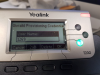
However, despite the handset working, I keep getting this error popping up on the handset requiring me to hit the Cancel button to clear it.
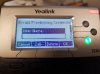
I assume it is to do with this screen in the phone:
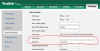
How do I stop this from happening?
I tried to clear the password from the phones setting, however it repopulates on save.
We do not want to use provisioning credentials unless we have to. Where is this set on 3CX?
(It does not appear in the phone extension settings).
The phones firmware is 44.83.0.55
Or is this to do with certificates? (Only accept trusted certs is Disabled).
Any assistance appreciated.
# For searches actual text on phone is Invailid Provisioning Credential
We are using standard provisioning template for the above handset.
However, despite the handset working, I keep getting this error popping up on the handset requiring me to hit the Cancel button to clear it.
I assume it is to do with this screen in the phone:
How do I stop this from happening?
I tried to clear the password from the phones setting, however it repopulates on save.
We do not want to use provisioning credentials unless we have to. Where is this set on 3CX?
(It does not appear in the phone extension settings).
The phones firmware is 44.83.0.55
Or is this to do with certificates? (Only accept trusted certs is Disabled).
Any assistance appreciated.
# For searches actual text on phone is Invailid Provisioning Credential