Solved Help please, my IP has been blacklisted and I can't access my hosted 3CX

Status
Not open for further replies.

DavidM84

Free User
Joined
Mar 5, 2022
Messages
96
Reaction score
32
I was testing Jitsi and tried too many times to add my sip account (which I still don't know how to do obvioulsy)
and my IP has been blacklisted.

Can anyone help me whitelist it so I can log into Management Console again?

Rookie mistake I know...
 
Are you suggesting you're going to give someone your password? That's just making a bad problem worse. Just sign up for a free VPN service, there's even one that works as a Chrome browser plugin
 
  • Like
Reactions: DavidM84
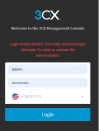
I just did that, the 3CX login page says "IP blocked" (using my VPN)

Untitled.png
 
So step 1 would be to confirm the VPN is working by checking whatismyip.com or ipchicken.com with the VPN on and off and make sure it changes. Of course this is also assuming your 3CX is hosted/cloud based. Is it?
 
  • Like
Reactions: N_G and DavidM84
So step 1 would be to confirm the VPN is working by checking whatismyip.com or ipchicken.com with the VPN on and off and make sure it changes. Of course this is also assuming your 3CX is hosted/cloud based. Is it?
I disconnected my VPN and reconnected to a different server, and I was able to get in :)

This topic can be closed, thank you guys!
 
Status
Not open for further replies.

Forum statistics

Threads
111,974
Messages
590,081
Members
164,899
Latest member
mazet