Help With CFD

Status
Not open for further replies.

dcorazon

Silver Partner
Advanced Certified
Joined
Mar 12, 2020
Messages
26
Reaction score
4
Hello, Hope you're all doing well.

I need help on how to use CFD to create a condition to check if an extension is in "Do Not Disturb" mode and then route the call accordingly.

Basically, when the call reaches the CFD app, it first checks if it is within office hours. If yes, it checks if extension 202 is in "Do Not Disturb" mode. If "Do Not Disturb" mode is active, it transfers the call to number 194 (which is an external extension reachable via Bridge). If the extension is not in "Do Not Disturb" mode, it transfers the call to Ring group 228. If it is outside office hours, transfer the call to IVR 802.

To summarize:

  • If Office Hours = Yes and 202 is Do Not Disturb = Yes, Transfer to 194 (external number)
  • If Office Hours = Yes and 202 is Do Not Disturb = No, Transfer to Call Group 228
  • If Office Hours = No, Transfer to 802 IVR
 
You can do this using a datetime condition and a conditional branch inside that checks for the GetExtensionStatus, which will give you the current profile.

That being said, you could use the extension itself as a routing point with the two statuses properly setup and an exception for outside of hours (which are processed first.)
 
In addition, the Get Extension Status component will have the value "Out of office" (with that case) in the property CurrentProfileName. You should use that in your condition.
 
  • Like
Reactions: Evolute IT
Hello. thanks all,

I will look at it. and to explain a little bit, the CFD app will be used as a destination if no answer for a call queue with 1 agent. Then if the agent put himself to DND in office hours the call will be routed to another office. but if not in DND (means the agent is busy with another call for example but not in DND the call will be routed to other colleagues in the same office).
 
If i take a simple CFD (not implying office hours fo the moment) how do i create a condition to get the status and forward the call?

i did this but it seems not working
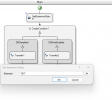
Here i get the extension status of the extension 901
1722258751010.png

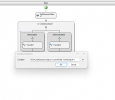
Here is the condition

1722258777400.png

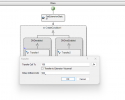
and the transfer in the condition
1722258808293.png

Maybe i'm doing something wrong?(Like not writing correctely the value Do Not Disturb) Do someone have a link on where i can get the possible value returned by each CFD component ? or in the 3CX CFD windows App where I can see the possible returned value for each key?
 
Sorry I misunderstood (English is not my first language) the reply. I thought "Out of office" means "Not in Office Hours",

I just checked the link and the indeed talk about the Get Extension Status and the property CurrentProfile, but they didn't give the possible value (unless I read it wrong)
 
The property you need to check is CurrentProfileName and not CurrentProfile.
 
  • Like
Reactions: dcorazon
To add on this, the property CurrentProfile is an object containing many properties, one of them being the name. The CurrentProfileName property is a shortcut to get it.
 
The property you need to check is CurrentProfileName and not CurrentProfile.
Yeah I corrected It. Working as expected. Thanks. And where I find the differents values of the properties? not just for get extensions but for other for future purpose ( The link you provides before juste give the properties but not the values you can have in it)
 
The possible profile names are the following:
Available: “Available”
Away: “Away”
Do Not Disturb (DND): “Out of office”
Lunch: “Custom 1”
Business Trip: “Custom 2”


For other properties, I guess you will need to play around and see what you can see in each property, as there is no much documentation. Actually, you can get something from here:
https://www.3cx.com/blog/releases/v20-call-control-api/
 
Status
Not open for further replies.

Forum statistics

Threads
111,973
Messages
590,078
Members
164,896
Latest member
sameage