Help with Very Basic Multi-Line Setup

Status
Not open for further replies.

Matthaios

Customer
Joined
Feb 12, 2020
Messages
17
Reaction score
0
I have a SIP trunk with 3 concurrent calls. 3CX (Enterprise level) is at the current version.

At the moment, there is just one person answering 1 physical phone (a Yealink 46s with the 3 lefthand buttons set up for 3 lines).

How do I simulate an analog hunt line, where the person is on a line and an incoming call lights up the second line?

I have only set up 1 extension, used to provision the physical phone, and of course it's working fine except for no multi-line capability. Do I need to set up 2 other extensions? I have no phone to provision them but could just assign them to a computer softphone temporarily to make them active. I do have a zero extension that is used on a mobile. On the mobile app I appear able to use the lines 1 through 3 buttons to do outgoing calls as expected.

Ring group is set to ring all simultaneously.

I have call waiting turned on, but there seems to be no audible signal an incoming call is coming in.

I could just set up a queue, but eventually we will have more phones and people and need to be able to use multiple lines.

Sorry if it's a super basic question, but I've looked through the forum and can't find the answer. Thank you in advance.
 
Hi @Matthaios

We do not support having multiple lines on a single device. It's one device - one extension.

There may be other ways to achieve what you want or perhaps rather than simulate an older system, set up something new instead.

Right now, your agent is acting like a receptionist that picks up the calls so I would suggest to not use a ring group or queue, simply enable "accept multiple calls" and assign some shared parking slots via the BLF section. Here is what a call flow would look like using the above:

1) Call 1 reaches the DID and it is sent to the Receptionist as its default destination
2) Receptionist picks up call and talks
3) Call 2 arrives, receptionist puts Call 1 in Shared parking 1, and is free to answer Call 2
4) Call 3 arrives, receptionist puts Call 2 in Shared parking 2, and is free to answer Call 3

At any time you wish, you can park and unpark one of the 3 callers. The shared parking BLF will change to show that the parking is occupied.
 
If picking up the calls is just to say callers "hold on please" and they stay on MOH during waiting time so IMO a Q do it alone better without the need to park and unpark and no stress to have multiple ring when you are already speaking to someone.
 
  • Like
Reactions: Evolute IT
I should probably set up a queue, but the problem still exists that it would be nice to have some indicator that another call is in fact coming in. Right now, there is no way to tell, let alone pick up, an incoming call while on an existing call.

I saw the shared parking and set the first 3 up in the BLF console to that option. Now the phone buttons show SP1, SP2, and SP3, but it still seems each incoming call gives no warning while on an existing call. The incoming call just gets routed to voicemail.
 
I should probably set up a queue, but the problem still exists that it would be nice to have some indicator that another call is in fact coming in. Right now, there is no way to tell, let alone pick up, an incoming call while on an existing call.

in addition to the queue you can use the wallboard via webclient or windows client , you'll see all details from Q in real time.
 
I should probably set up a queue, but the problem still exists that it would be nice to have some indicator that another call is in fact coming in. Right now, there is no way to tell, let alone pick up, an incoming call while on an existing call.

I saw the shared parking and set the first 3 up in the BLF console to that option. Now the phone buttons show SP1, SP2, and SP3, but it still seems each incoming call gives no warning while on an existing call. The incoming call just gets routed to voicemail.

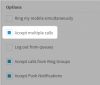
This is because you have not enabled "Accept Multiple Calls".
1581583288662.png
 
If you enable the feature, as mentioned above, you should get a call waiting indication (tone) on the set. If you want more than one line key (multiples of the same extension, or multiple different extensions), then you will have to either provision the set manually (if the set allows), or, modify the set template. Both could be done, but neither are officially "supported".
 
I just tried it and with Accept multiple calls turned on with a T46S. I have two BLF Line keys. First call came in and I was on the phone. Second Call came in and my second line key flashed red and the display on the phone indicated I had an incoming call. I also heard a tone to indicate another call coming in.

This is how my BLF keys are setup. This is supported with these phones. In fact if you look at the IP phone list known limitations for a bunch of them supported on 3CX they require the first two keys to be Line Keys

T46 Multiple Lines.JPG
 
Thank you all for the further input.

In fact I ticked the 'Accept multiple calls' from the very beginning. That was an obvious one not to miss, but clearly I am missing something else.

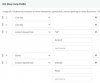
In response to the suggestion to do 'Shared Parking, here is what I had these past 2 days, which has not seemingly worked correctly.

Screen Shot 2020-02-13 at 10.21.11 PM.png

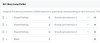
I have not tried the 'line key' option and will try that out during biz hours tomorrow. Here is my current setting.

Screen Shot 2020-02-13 at 10.21.29 PM.png
 
Hi @Matthaios

Both methods should work if you have Accept Multiple calls and you receive direct calls (not from a queue)

With 3 Shared Parking slots you can park anyone you are talking to and pick up the next pending call

With 3 Line Keys as @SMF Media said you can see the next line key flash as a new call comes in. You can switch between them easily

If it did not work the first time round, ensure that the DID is routed straight to your extension, and reset/reprovision the phone with our defaults. I tested this on our latest PBX release, with a T46S on firmware 66.84.0.95 and both methods were successful. I think the line keys method @SMF Media suggested is the easiest.
 
  • Like
Reactions: Evolute IT
Status
Not open for further replies.

Latest Posts

Forum statistics

Threads
111,937
Messages
589,831
Members
164,818
Latest member
Guriqbal Singh