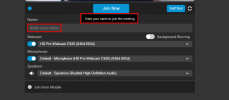
Highlightinh Name input Field when joining

Status
Not open for further replies.

B-ITLukas

Silver Partner
Basic Certified
Joined
Apr 20, 2017
Messages
2
Reaction score
0
Hi everyone

Our Customers have the problem, when they arrange a video meeting via Desktop Outlook invitation with a client for the fist time, that the clients can't join because they haven't entered a nme in the inputfield.
Somtime the whole option to join via computer is hidden, and al they see is the button join, but it won't work.

It would greatly help if the inputfield would be highlighted to draw attention to entering a name

Br
 
Hi,
When you join as organizer, you don't need to input a name, then the field is hidden and you can always join.
The same happen if you invite explicitly one participant sending a personal invite link to him.

Instead when you use the openlink to join as participant then you should see something like this:

1692964919548.png

In this case there is an input field labeled "Name:" where you have to insert your name.
If you try to click the join button without filling the name field, then a black popup wiill appear asking to enter your name.
Does your customer see it?
 
hi Emanuelle ,

the Problem is that sometimes there is no aviable Field for Entering a Name and the Customer told us that he has to "activate" the Circle on the Left Side from Join Now to get this Field.

Is there any option that we can activate this all the time ?


thanks and best regards,
 
Hi,
if the field to input the name is not present, then it means that the system recognize the user as organizer.

It is possible in 2 cases:
1. the user is using the organizer link
2. using the openlink from the same browser on the same pc where the user joined before as organizer.

As organizer it is always possible to join, but you cannot use the organizer link more than once for the same meeting.

Try to schedule a new meeting.
Notice the link that is produced, It is the organizer link (don't share it otherwise other users can join as organizer). Then click on the link, you should be able to join.
If you look at the url in the browser bar you should see a different link: it is the open link.
It is the same link you have inside the invite card during the meeting, and it is the same link reported inside outlook ics file.

If you try to use this link from another machine or another browser or the same browser but from an incognito window, you will join as participant, then you will see the input field.
If you try to use the open link from the same browser on the same machine where you previoulsy joined as organizer, you will continue to join as organizer.

Can you confirm that this is working for you?

Thank you
 
  • Like
Reactions: jed
Can your problem be related to the usage of firefox?
 
Status
Not open for further replies.

Latest Posts

Forum statistics

Threads
111,973
Messages
590,075
Members
164,895
Latest member
jasonkkrause