- Joined
- Jun 13, 2017
- Messages
- 424
- Reaction score
- 256
Valid annual license running 16.0.619 on Linux.
I can open a support ticket if there are no suggestions but I feel like I'm missing something.
I've recreated this issue on 2 different servers and got the same result.
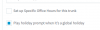
1. On the SIP trunk that receives incoming calls, I've checked the "Play holiday prompt when it's a global holiday" box.
2. In Digital Receptionist > HOL Out of office IVR, I've set a sound file that announces the office is closed for the holiday and then if no input within seconds: 1 sends them to the normal IVR for outside business hours.
3. In Settings > Timezone & Office Hours Settings, I've configured a holiday as From 1 July 2020 To 15 July 2020 with no sound file.
When a call comes in, it is being directed to the IVR for outside business hours and not the HOL IVR.
I even tried adding the sound file to the scheduled holiday entry in settings but it doesn't play it there either, it just sends them on to the outside business hours IVR.
I took the sound file and set it for the outside business hours IVR and it plays there (just to verify there wasn't an issue with the sound file).
Is there something I'm forgetting?
**Also tried adding the sound file to the holiday in settings and unchecking the "Play holiday prompt..." under the SIP trunk. It still just directs straight to the outside business hours IVR.**
I can open a support ticket if there are no suggestions but I feel like I'm missing something.
I've recreated this issue on 2 different servers and got the same result.
1. On the SIP trunk that receives incoming calls, I've checked the "Play holiday prompt when it's a global holiday" box.
2. In Digital Receptionist > HOL Out of office IVR, I've set a sound file that announces the office is closed for the holiday and then if no input within seconds: 1 sends them to the normal IVR for outside business hours.
3. In Settings > Timezone & Office Hours Settings, I've configured a holiday as From 1 July 2020 To 15 July 2020 with no sound file.
When a call comes in, it is being directed to the IVR for outside business hours and not the HOL IVR.
I even tried adding the sound file to the scheduled holiday entry in settings but it doesn't play it there either, it just sends them on to the outside business hours IVR.
I took the sound file and set it for the outside business hours IVR and it plays there (just to verify there wasn't an issue with the sound file).
Is there something I'm forgetting?
**Also tried adding the sound file to the holiday in settings and unchecking the "Play holiday prompt..." under the SIP trunk. It still just directs straight to the outside business hours IVR.**