Holidays not working

Adrian-Blue

Gold Partner
Basic Certified
Joined
May 4, 2021
Messages
12
Reaction score
0
Hi,

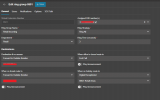
I have just had a call from a client saying the holiday I setup for them isn't working. They asked me to set a holiday for today and Monday to close the phones 1 hour earlier than they normally close at 4pm. The call is still using the day route and the system has not gone into holiday mode. Could someone tell my why this is happening please.
1766161737789.png
 
Hello, have you followed the guide?
 
  • Like
Reactions: fxbastler
Hello, have you followed the guide?
Isn't that guide for using call scripts? I'm not using a call script. I am just setting the date and times in the holiday section of the admin portal. It works fine if the holiday is the whole day. It's just when the holiday starts mid way through the day. The system isn't going over to holiday mode it's just staying in Day mode.
 
Do they have one department only?
 
Do they have one department only?
Yes, the only department on the system is the default department. Which I have renamed.
 
@Adrian-Blue If it is after 4pm you could just make today a full day holiday since you say that works.

What is supposed to happen on a holiday, just different routing on the trunk? You might enable verbose logging and check the logs for how 3CX is routing the call.

The call script is required to play a custom holiday prompt.
 
@Adrian-Blue If it is after 4pm you could just make today a full day holiday since you say that works.

What is supposed to happen on a holiday, just different routing on the trunk? You might enable verbose logging and check the logs for how 3CX is routing the call.

The call script is required to play a custom holiday prompt.
I could do that for this particular instance. My issue is I have setup a lot of Holidays for our customers over the Xmas period. Many of them have days where they only work until lunch time. I have created holidays that start at that time. If it's not going to kick in then I need to find an alternative method of setting up partial day holidays. I may have to setup breaks on the partial days rather than Holidays. this will have the same effect.
 
Have created the "failed" holiday for this user when the holiday time already started? If so, it will be rescheduled to the next year.
Thus if you created holidays on time, the will work regardless if they are full day or partial.
 
FWIW I just created a test holiday and it worked. It is currently 11:30, I created a holiday from 11am-12pm, and a test call plays the prompt. v20u7.
 
I have this same issue on one instance and not others. Not great when holidays do not work as expected.
20.0.7.1080. Looking back at updates, this seems to have begun after the overlapping "year" feature was updated in the holiday scheduler. Something has broken the call flows for holidays.

Forward dates do not activate holidays. Current dates do not activate holidays. Partial or complete days do not make a difference. I can manually activate them.

After meticulously going through all departments, Office hours, users, trunks, DID's, queues etc etc I cannot resolve the issue.
All departments are matched end-to-end for the routed calls. I attempted with holidays.cs script enabled and disabled. Holiday prompts added or removed. User forwarding checked, status checked, and I've reached my level of willingness to dig.
The call flow logging shows holiday mode is detected as active but is not actioned. It detects holidays, then routes to OOH or even worse, delivers the call. Out of office, call forwarded

12/29/2025 5:55:11.252 PM [CM503012]: Inbound out-of-office hours rule (unnamed) for 10000 forwards to DN:***
12/29/2025 5:55:11.252 PM [Flow] It is holiday today
12/29/2025 5:55:11.252 PM [Flow] Looking for inbound target: called=**********; caller="**********" <sip:**********@:0>

If I manually override the office hours and put any of the affected departments into holiday mode, they process the routes as expected. On holiday, call forwarded

My client installation with the holiday routing issue is 20.0.7.1080. This particular installation is a backup restored from a failed V18-V20 upgrade.
I have no choice now but to manually update this instance for all holidays, other than to route to an IVR using break times - if they work.

Also, poor response from you above ivank, Adrian was asking for help, not asking to be dismissed.
 
Where is the did set to? How is the holiday routing? The script works as expected.
 
Note the last two posts in that thread (as of today) mention 3CX removing a parameter from the group/department, and recreating the department, both fixed it.
 
Thanks partners, I really appreciate the responses.
I'll have a read through the recent updates to the post, attempt a fix and report back.
 
Thanks @SteveITS and @fxbastler for the suggestion, partners like you guys are truly the backbone of this community.
I can confirm that creating a new department does indeed fix the holiday routing issue for any new department created.
Custom call script (holidays.cs) aside, as I'm assuming that it now gets triggered as the call flow was routing correctly.
  1. Created new Department - Holidays
  2. Created Office hours - 9-5 M-F
  3. Created holiday hours - 25th 2025 - 4th 2026
  4. Created call Queue - Holidays Test Queue
  5. Set OOH, Break and Unanswered to "End Call"
  6. Set Holidays to voicemail with Prompt
  7. Added Queue to Holidays Department
  8. Changed default routing of Trunk to Holidays test queue
  9. Placed test call - routed straight to the expected Queue Holidays routing, with prompt playing.

    Yes, all of my departments were also previous V18 groups that were converted during the upgrade to V20, which seems to be the root cause of the issue.
@Adrian-Blue if it's still relevant for your customers, I'd suggest creating a "Holidays Department" to quickly add staff and queues to so that you can at least worry about fixing it next year.

3CX -
I got lost in so many posts about the explicit holiday messaging involving the "holidays.cs" call script. Add a message to the dropdown where people add the call recordings in office hours -> Office Holidays -> Prompt telling everyone that a script is REQUIRED, or embed the script to it's NOT required. It's a VERY simple thing to change. Also just an FYI that if you do push through the extension limiting based on SC license, I will be moving platform.
 
@Deep_CuTz
If you want to know how the call is really being routed and whether the call destination is actually in Holiday status, please read through this post, integrate this one line in the correct place in holiday.cs, make a test call and observe the output in 3CXCallFlow.log.

if you do push through the extension limiting based on SC license, I will be moving platform.
We have eliminated temporary dummy extensions for all customers who previously needed them. There are now only real users in the 3CX system. It does not affect any of our usual 3CX customers. The others who are still affected (small license, few SIP trunk lines, many users) see the value of a 3CX and have had no problem with a moderate increase so far ...
 
  • Like
Reactions: Deep_CuTz
FYI, this is the confirmed fix, thanks to @fxbastler for lighting the way.

First, go to admin -> Advanced -> Parameters

Then enable DN Properties:

You can check them from the 3CX Console > Settings > Parameters. For DN properties, you will need to set the property DEVELOPMENT_DNTABLE_EXPOSE to 1

Then select the new DN Properties Tab, select any old departments that require the update from the dropdown, then click DISABLE_HOLIDAY_OVERRIDE, change the Value to 0 and save.

Checked logs, works. Reception (110) → On holiday, call forwarded to Voicemail Box.
No manual override set.
 
I seem to be experiencing the same issues, a ring group is not following holiday schedule.


I have checked the DISABLE_HOLIDAY_OVERRIDE parameter and this was already set to 0.

My instance was not created in v18 but was created in v20 though, so imagine my issue might be unrelated.


1771427358620.png


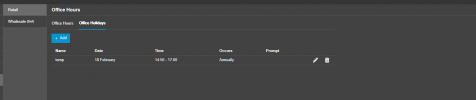
This event was created at 14:54 so as far as I can tell, should be no reason why it would not kick in.

1771427429927.png
 
Your group is in Retail dept, yet the holiday is for Wholesale
 
Or I misread it from small Pic on mobile
 

Forum statistics

Threads
111,978
Messages
590,100
Members
164,907
Latest member
d.obermeier