Host unable to connect to web meeting

Status
Not open for further replies.

bmrouse

Customer
Joined
Sep 23, 2020
Messages
8
Reaction score
1
Since upgrading to v18.0 Update 6 (908), have not had success connecting host to begin scheduled web conference. This message displays for host attempting to start meeting from web browser: "Meeting has not started yet. Please try again later."

Host was able to start meeting from iOS app. I suspect this issue stems from issue with connecting to meeting using FQDN vs private LAN address on local network.

Any advice on recommended settings? Not sure what changed with the recent update. Until now, have not had this issue.
 
Hi,
from what you are saying it seems you are using the open link to join the meeting, not the host link.
Where do you click to join the meeting?
 
I have tried using JOIN link from host webclient. No success starting meeting. In the past, would use this link to begin meeting.

Was able to start meeting using host link from notification email.

Is it possible weblink from webclient not pointing to host link?
 
After more review, it appears the only working host link arrives in the invitation email which includes the FQDN or local Lan address. After creating the meeting in the web client, the links provided with the scheduled conferences page direct to the meeting page as though I am a participant. Meeting links listed on the web client do not connect as host until after I have initiated meeting with link provided in the meeting invitation email.
 
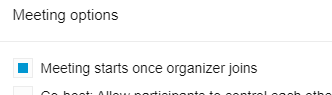
@bmrouse The default when a meeting is created, is that "Meeting starts once organizer joins" is checked. When creating the meeting, click the gear/settings icon and you'll see:
1675725624439.png
If that is checked, then the organizer has to start the meeting with their link and not the link in the calendar invite, which unfortunately pops up in their Outlook reminder if they imported the .ics to put it in their calendar. If they use the "everyone else" link then the organizer has never joined. The organizer link is also in the client when they open Meet and open the conference.
 
Hi,
@bmrouse I can reproduce your behaviour disabling completely cookies.
We use a technical cookie to avoid (or reduce the probability) to the organizer to share his own link to participants by mistake.
If you check in the url bar you will see that the link is always the open link and never the host link, also when the host clicks on his own link.
If you completely disable cookies the system is not able to recognize the host and the user will be considered as participant.
Can be this your case?
 
Thank you for your help! I have been cautious of disabling "meeting starts once organizer joins" for the concern that participants wait in silence who connect early (before host starts meeting) or to another meeting scheduled for a later time (in error). Participants who join meeting by phone, before the host starts meeting, hear the system "on hold" file prior to the meeting, at least are aware of an active presence on the other end of the connection.

When I disable "meeting starts once organizer joins" now, I now see the host link for scheduled meeting in the web client. This was a change of format from earlier 3cx versions. When previously logging as host into web client from desktop computer, the host link was the populated address for scheduled meeting. The present Meet (scheduled conference) only displays participant link when logged in with host credentials.

I cleared cookies and website cache from browser, but this did not correct my issue. The corrective action is to set future scheduled meetings with "meeting starts once organizer joins."
 
If that option is unchecked they can talk to each other while waiting. :)
 
Hi,
the correct behaviour must be the following:
1. In the web client the host must ALWAYS see his own link, and NEVER the open link (participant link)
2. Changing "meeting starts once organizer joins" must not change the link the organizer sees. The host will always see his own link in the page
3. If you don't want that participants join before the host you should keep the default
4. Clicking on the host link it will open a new tab containing the meeting page. From here the host must be able to join. If you see "Meeting has not started yet. Please try again later." it means that the user is recognized as participant also if he was using the host link. One possible reason of that is that it is impossible for the application to set a technical cookie. This can be due to a browser setting or browser extension that prevents to do that.

If you can send me privately the host link I will check it
 
A big thank you to Emanuele.

My problem was corrected by using FQDN address to connect to webmeeting webinar instead of local lan ip (even though this ip resolves to FQDN). This has not been an issue in past for me, until recent update.

No need to disable "meeting starts once organizer joins"

And thank you to SteveITS, right you are! Voice only participants can talk to one another before meeting begins.
 
Technically, with "meeting starts once organizer joins" unchecked, anyone can join the meeting at any time before the meeting date. I've actually had people join on the wrong day and get confused. But with it checked, the organizer needs to 1) participate, and 2) use their special link. So there are pros and cons.
 
This makes no sense! So the end user (who set the meeting up, aka host) clicks on the link under "Click on this URL to join the meeting" (the word link would be a more friendly name then URL but whatever) and it has them join the meeting as a participant therefore getting the error "Meeting has not started yet. Please try again later"? Go to the email a click the link "If you are in the office you can join from here" and same issue! Select "Joining info" link and it just works! So 1, why have the office link? 2, why isn't the joining info in the app!? I have people screaming to go back to bloody Zoom this has to be done better!
 
> why isn't the joining info in the app

The organizer needs to/can join from the desktop app or web client, under Meet.

If it was in the calendar invite it would be sent out to participants and presumably 3CX doesn’t want that. I too think it would be helpful to have a standard note in the invite that “organizer must join using their special link” or something like that.
 
The problem above was generated configuring the pbx with IP and not using the FQDN.
This is technically possible, but not supported, then it can create problems.
The platform is working ok using the FQDN.
Using the IP any user will be recognized as participant, using the browser.
Using the app doesn't have this issue

3CX doens't require to have an account to join a meeting, only to have a valid key. Other platforms require the user to have an account. This different approach creates different access behaviour.

@LHambly is your pbx configured with IP or FQDN?
If it is configured with FQDN we need to investigate more your case.

Regards
 
am also having the same results. I did not originally setup the server, however, we are able to reach the server with an FQDN. It includes our company name. If that's the case, is it resolvable after the fact?
Hi,
are you using a a scheduled meeting or the quickmeeting?
Can you send us privately a screenshot of the page that contains the link you are clicking to join?
Thank you
 
Status
Not open for further replies.

Latest Posts

Forum statistics

Threads
111,973
Messages
590,075
Members
164,895
Latest member
jasonkkrause