Hosted 3CX: When calling any DID caller gets the IVR

Status
Not open for further replies.

brichter21

Customer
Joined
Jun 24, 2022
Messages
5
Reaction score
0
Hi everyone. Currently building the system as we need it ... We have a system with 1 Trunk and 30 DID's. I have setup an IVR for business hours and one for after hours. The IVR itself works fine, my problem is that I want the IVR to answer only calls to the "main" number (a specific DID). However, any calls to any of the DID's registered in the system will also be answered by the IVR.and I am not able to figure out what I am doing wrong.

The audit logs only shows an external call (my cell phone) to IVR.(Extension 800).
Internal calling from extension to extension is fine - no IVR picks up.
All DID's are routed to the correct extension

I am pretty sure I have made somewhere a simple mistake but I give up for today as I am trying to figure this out for hours now.

Any help or pointers are greatly appreciated.
 
In Inbound Rules did you add a DID rule for each? (to set where you do want the call to go)
 
Yes I did. Every DID has the correct extension assigned.
 
Are you sure the DID is matching what's being sent? With/without the leading 1 for instance. Try enabling verbose logging for a call and see if that helps.
 
Hello everyone again. cobalit - thank you for your suggestion. I got a bit farther but still do not understand. After setting logs to verbose I got a lot of information and here is the line causing me the issue I believe: [CM503012]: Inbound office hours rule (unnamed) for 10000 forwards to DN:800

The thing is I can't for my life see the entry which is causing it to go to the IVR. I call from my cell phone to extension 399 using the DID # (number is 248-###-#### which is different then "main number 947-###-####) . The forwarding for 248-###-#### says during office hours to forward to 399 and after hours to 399 as well.

I have another rule forwarding the "main number" 947-###-#### to forward to the IVR but as I am not calling that 947 number it is not showing up in the logs of course.

The forwarding rules of extension 399 also forward to extension 399 for external calls after timeout.
 
If this is a matter of the DID number not being matched....
Take one DID rule, and replace the areacode with the wildcard *, so *222-1234. Then call that DID. If the call now routes correctly, then the original DID number you were using in the rule was not exactly the same as the DID number being sent by your provider. As long as the remaining 7 digits match, it won't matter what precedes it.
 
I am not able to replace or edit the number at all. I can only pick from the available numbers when creating a DID rule. The DID numbers were copied from the trunk provider and match exactly.
 
I am not able to replace or edit the number at all. I can only pick from the available numbers when creating a DID rule. The DID numbers were copied from the trunk provider and match exactly.
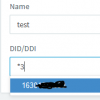
In Add Inbound Rule if you click the field it shows a dropdown but one can type also:
1656348599634.png
 
Correct - but as soon as I click on "OK", it reverts to the trunk number and then I can't change it anymore unless I delete it again.
 
Last edited:
Someone else had this issue a while ago. I can't be certain, but it may have helped by changing browsers, or clearing the cache.
 
@leejor It works for you? I tried a private browser window, same issue.
 
Status
Not open for further replies.

Forum statistics

Threads
111,974
Messages
590,083
Members
164,900
Latest member
Silent_Guru