Solved Hot Desk Phones Appearing in Web Client

Status
Not open for further replies.

roryperkins

Bronze Partner
Advanced Certified
Joined
Feb 12, 2021
Messages
3
Reaction score
2
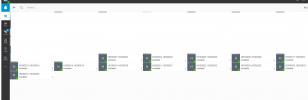
We have a 3CX phone system v18, hosted on Azures that seems to want to list available hot desk phones in the web client. These phone are waiting for someone to sign in to them (eg, *77*extension*). I don't seem to be able to find a way to exclude these phones from the web client. The Team area should only show people who have signed in.

Does anyone have any ideas?
 

Attachments

  • issue.png
    issue.png
    23.9 KB · Views: 14
On what devices are these hotdesking extensions provisioned on? Also, are these devices provisioned with the 3CX's default template and are running the latest supported firmware?

Hotdesking devices should not actually show presence so this is quite peculiar. Is this the full list of HD extensions by the way or are only some showing?
 
  • Like
Reactions: Evolute IT
On what devices are these hotdesking extensions provisioned on? Also, are these devices provisioned with the 3CX's default template and are running the latest supported firmware?

Hotdesking devices should not actually show presence so this is quite peculiar. Is this the full list of HD extensions by the way or are only some showing?

Hi thanks for coming back to me on this, the devices are Yealink SIP-T46S, the current version is 66.86.0.5 which is the latest and supported one. I also have some other T46S devices that have version 66.85.0.5 and they do the same thing.

All the phones are setup as hot desk phones, the extensions that have signed in will replace the HD0000 listing with their extension name. The ones that you have seen are hot desk phones that are waiting for an extension to sign in.

Thanks
 
Is this a new installation that was configured from scratch or used a backup to restore? If this is not a new installation, do you know what version this 3CX Instance started of with?

Try the following, in the Management Console, first click on Support in the upper right corner and then click on "Generate Support Info". This will generate a file bundle containing the logs in case needed. Then, go to "Users >> Groups" and edit the "DEFAULT" group and press "OK" without actually making any changes. Can you still see the same HD extensions in the webclient after you do this?
 
Thanks Chris, going into the Users/Group and clicking ok worked. Those available hot desk phones have now gone from the web client.

Also, for your info, we recently upgraded the instance from version 16 to 18. To do the upgrade, we had to create a new virtual machine on Azures and then do a restore. Perhaps there may have been some element that didn't restore correctly. Everything else seems fine with it.

Thanks again for your help.
 
You're very welcome!

Glad this has been sorted out!
 
Status
Not open for further replies.

Forum statistics

Threads
111,974
Messages
590,081
Members
164,899
Latest member
mazet