HOT - extensions won't login to queues

Status
Not open for further replies.

wa4zlw

Free User
Joined
Mar 23, 2019
Messages
59
Reaction score
2
We have a live call center and in two days two extensions (actually three if you count a test I did with my extension) refuse to login to the queues defined. We also just upgraded to the latest codebase this morning and still the same. Currently none of our agents can answer calls. what can we do to resolve this? What info do you need from us to assist?


Product Professional Annual
Version Number 16.0.1581

License status Activated


Thanks leon
 
update -- looks like only two of the four extensions (and if I add mine as well which is a queue manager) refuse to login to queue. This started yesterday (Saturday) eastern time. Please advise. thanks
 
Hi Leon,

What are you observing exactly? Can you give us more information on how you are logging them in and how you have verified that they are not part of the queue?
 
hi @JohnS_3CX

the extension never shows up in the queue. Either with the 3CX client or the WebRTC client.
Pressing the Q just toggles the Q but does nothing. We have a BLF button to logon and one to logoff the queues. Same thing. Two extensions work. If I added my extension (which is a queue manager) it does not show up logged in either.
Nothing shows up in the activity or event logs that I can see. This started on Saturday.

You guys have support access to the pbx.

thanks leon
 
here is one of the two extensions that works; currently we have one agent per shift. The Jhed and Charisse extensions won't login. Only Melvin and Rechelle. Both Jhed and Charisse were able to login using Melvins extension by re provisioning their client.

10706
 
Last edited:
We have a BLF button to logon and one to logoff the queues.

Have you tried to login using a method other than the BLF key?
 
@leejor yes it's posted above. And as I said, this started happening saturday.

Thanks leon
 
hi @JohnS_3CX

the extension never shows up in the queue. Either with the 3CX client or the WebRTC client.
Pressing the Q just toggles the Q but does nothing. We have a BLF button to logon and one to logoff the queues. Same thing. Two extensions work. If I added my extension (which is a queue manager) it does not show up logged in either.
Nothing shows up in the activity or event logs that I can see. This started on Saturday.

You guys have support access to the pbx.

thanks leon

Hi Leon,

Do you mean that you have opened a ticket for this case? If so then allow the Support team some time to investigate.
 
@JohnS_3CX no we can't open a ticket even though we are a partner :-(
 
Hi Leon,

The screenshot does not show what is inside specific queues, but it sounds like you might have some possible issues with Rights & Groups. I would suggest the following way of troubleshooting then:


First you need a user that is fullfills the requirements:
a.) a Queue Manager of all the the queues in question
b.) belongs to the same Groups as the agents in question
c.) has the correct rights to view group members and act as a manager

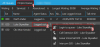
Log into the client with this extension, and find the users that are having the issue as follows:
  1. Don't go to "All Queues" but rather go to each queue individually and see if the problematic agents now show up (remember you are now a user with rights to view all - and a queue manager under the same Group as the agents).
  2. If they do appear, they will probably show they are logged out
  3. Right click them and click Login to queue

10730


i.) This is called an explicit login and is required.
ii.) Also make sure that the agents in question are actually part of the queue in the management console, by removing them from the queue, pressing ok, then adding them back in the queue and again pressing ok
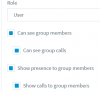
iii.) In addition ensure that each agent in question has the Rights below as a minimum
10732
 
Status
Not open for further replies.

Latest Posts

Forum statistics

Threads
111,925
Messages
589,757
Members
164,798
Latest member
Call_Flow.co.uk