Solved HotDesking phones just do not log in

Status
Not open for further replies.

Guvna

Joined
Aug 14, 2017
Messages
8
Reaction score
3
I've included a youtube link here for clarity.
But the phones provision perfectly, however, when attempting to log in, it goes through the process, and then back to the main screen and nothing happens.
The 3CX management console says that a user is logged in on that particular phone, but the phone itself does nothing.

Yealink T48S - 66.86.0.5
3CX 18.0 Update 3 (Build 461)


Hope someone can help.

Many thanks.
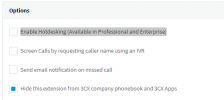
 
Have you enabled hotdesking, under options for the user

1648813443388.png
 
  • Like
Reactions: Evolute IT
Yes, otherwise it wouldn't have said the phone was being logged into the account.
 
Hi Guvna,

Was it playing tricks on you? xD
1649055395125.png


In all seriousness though, this model takes considerably longer than other models to provision, and this is expected behavior. Newer models from Yealink are much quicker (ie. T48U clocking in at about 15sec).

The T48S can take upto 1 minute to show your extension, and upto 2 minutes to finish all its provisioning tasks in the background (for the light to stop flashing).

Does yours eventually finish provisioning though if you leave it long enough?
 
  • Haha
Reactions: NicholasP_3CX
Hi, thank you for your replies. I have solved the issue. For future reference, it was a faulty switch that was causing this to happen. We could get as far as the certificate screen when logging into the 3cx web-admin gui, but no further. White screen. Also, the phones would only provision half the time.
Turns out there were other gremlins with other services, and pointed at the switch. Once swapped, all is working correctly again.
 
  • Like
Reactions: JohnS_3CX
Status
Not open for further replies.

Members Online Now

No members online now.

Forum statistics

Threads
111,831
Messages
589,277
Members
164,660
Latest member
RJenkinsROCK