Hotfix Available for V18 Beta 1

  • Thread starter Thread starter Constantinos Constantinou
  • Start date Start date
Status
Not open for further replies.

Constantinos Constantinou

A hotfix is available for V18 Beta 1 which includes several bug fixes, including the known audio issues addressed in the V18 Beta release.

In this Hotfix​

  • Fixed audio problems in cases where an extension has “Recording” enabled for external calls.
  • Fixed audio recording problems in the case of an IVR or Queue.
    [*...
 
Great. Thanks for fixing the voicemail on transfer thing.
 
Is this beta stable enough for use in small client setup? Some downtime isn't a big issue
 
Is this beta stable enough for use in small client setup? Some downtime isn't a big issue
It is very stable generally, still a few minor things to fix here and there, most of which you might never see.
However, I do agree with @PhoneOnline , for peace of mind, I'd wait a little longer until it is Final before installing it on a paying customer, only do it if absolutely necessary.

If you do, make sure you check "Automatic Updates" so that when the final does get released, their system will automatically upgrade, so you don't accidentally forget it on Beta.

If you have already installed V18 for any customers, be sure to install the Hotfix on their systems.
 
It is very stable generally, still a few minor things to fix here and there, most of which you might never see.
However, I do agree with @PhoneOnline , for peace of mind, I'd wait a little longer until it is Final before installing it on a paying customer, only do it if absolutely necessary.

If you do, make sure you check "Automatic Updates" so that when the final does get released, their system will automatically upgrade, so you don't accidentally forget it on Beta.

If you have already installed V18 for any customers, be sure to install the Hotfix on their systems.
Thanks @NickD_3CX, currently only running it on my NFR installation. I have a customer that is really interested in the SSO options with v18.
 
It is very stable generally, still a few minor things to fix here and there, most of which you might never see.
However, I do agree with @PhoneOnline , for peace of mind, I'd wait a little longer until it is Final before installing it on a paying customer, only do it if absolutely necessary.

If you do, make sure you check "Automatic Updates" so that when the final does get released, their system will automatically upgrade, so you don't accidentally forget it on Beta.

If you have already installed V18 for any customers, be sure to install the Hotfix on their systems.
Hi Nick,

Can you confirm if the system will automatically updade as it was previously stated on this forum that it will be a manual upgrade, due to the OS upgrade?
 
Hi Nick,

Can you confirm if the system will automatically updade as it was previously stated on this forum that it will be a manual upgrade, due to the OS upgrade?
Sure, but I need to understand what you're referring to. Which upgrade?
V16 U8 --> V18 Final?
V18 Beta --> V18 Final?
V18 Alpha 5 --> V18 Beta?
 
Sure, but I need to understand what you're referring to. Which upgrade?
V16 U8 --> V18 Final?
V18 Beta --> V18 Final?
V18 Alpha 5 --> V18 Beta?
Hi Nick,

Sorry I think I misread your original post. V16 U8 - V18 Final.
 
Hi Nick,

Sorry I think I misread your original post. V16 U8 - V18 Final.
Thanks! OK, so no, this will not happen automatically because to go from V16 to V18, it also will require the OS upgrade.
While we have improved the OS upgrade process to the point where there are very very few failures if you've installed per the 3CX guidelines, it is still something that we feel should be triggered manually.

The exception of course is, 3CX installations Hosted by 3CX. Those are upgraded and overseen by our Hosting Team.
 
Initial thread in Portuguese:

https://www.3cx.com.br/forum/thread...io-usando-extensão-chrome.100018/#post-330997

I use a prefix in the outbound rules to deliver to a SIP operator the correct techprefix of the customer identification. (i.e. 535005547)

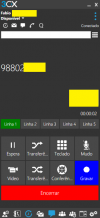
When dialing using Windows Application and Mobile, such calls occur normally, and only the dialed number is apply. (98802xxxxx)

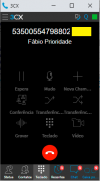
When dialing using a 3CX Extension in Chrome, the call occurs normally, but the entire techprefix is applied along with the called number (53500554798802xxx)

I would like to check as "NO" to display the prefix to the user using the extension.

This case occurs on more than one customer.
extensão.pngapp-windows.png

3CX Version: 16.0.9

Guided by Alejandro, on the link above, I tested it on v18 last version.

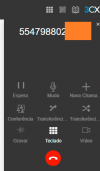
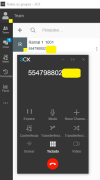
The same problem occurred on V18, I just changed the prefix for testing, including just 5547.
v18.png
App-V18.png
The problem in this case is that the number displayed to the operator is too large and causes confusion when reading the number (techprefix+number), which in some cases has 11 digits.

In the example the techprefix is: 5547 and the number entered is: 98802-xxxx
 
SBC update not working on pi, click update nothing happens. From Ver 16.2.24 have clicked and waited several times..
 
Initial thread in Portuguese:

https://www.3cx.com.br/forum/threads/techprefix-exibido-ao-usuario-usando-extensão-chrome.100018/#post-330997

I use a prefix in the outbound rules to deliver to a SIP operator the correct techprefix of the customer identification. (i.e. 535005547)

When dialing using Windows Application and Mobile, such calls occur normally, and only the dialed number is apply. (98802xxxxx)

When dialing using a 3CX Extension in Chrome, the call occurs normally, but the entire techprefix is applied along with the called number (53500554798802xxx)

I would like to check as "NO" to display the prefix to the user using the extension.

This case occurs on more than one customer.
View attachment 23196View attachment 23197

3CX Version: 16.0.9

Guided by Alejandro, on the link above, I tested it on v18 last version.

The same problem occurred on V18, I just changed the prefix for testing, including just 5547.
View attachment 23194
View attachment 23195
The problem in this case is that the number displayed to the operator is too large and causes confusion when reading the number (techprefix+number), which in some cases has 11 digits.

In the example the techprefix is: 5547 and the number entered is: 98802-xxxx
After discussing this with our Dev Team, for the time being, this is the expected behavior for the new types of clients, like Chrome Extension, WebClient, New Windows App (Electron), etc.
Older clients, like the old Windows App do it differently.

For the time being there is no way to get the 'old' behavior on the 'new' apps.
I have provided this as feedback and we may consider it for the future.
 
  • Like
Reactions: Alejandro_3CX
Hello 3CX team,

We have a problem with an extension on our test environment (v18 BETA hotfixed).
The extension's transfer rules have never been changed and this extension is connected and is in "available" status.
All calls we make to this extension are going go to the extension's voicemail, so the user cannot pick up when they receive a call....

This is the second time we have encountered this problem with an extension 'stuck to voicemail'.
Disconnect and reconnect the extension, change the status and restart the 3CX server don't resolve the problem.

Do you have an idea in order to resolve the issue without delete and recreate the extension ?

Thanks for all work you are doing for v18.

Best regards,
 
Hello 3CX team,

We have a problem with an extension on our test environment (v18 BETA hotfixed).
The extension's transfer rules have never been changed and this extension is connected and is in "available" status.
All calls we make to this extension are going go to the extension's voicemail, so the user cannot pick up when they receive a call....

This is the second time we have encountered this problem with an extension 'stuck to voicemail'.
Disconnect and reconnect the extension, change the status and restart the 3CX server don't resolve the problem.

Do you have an idea in order to resolve the issue without delete and recreate the extension ?

Thanks for all work you are doing for v18.

Best regards,
I doubt this is related to V18 and it is probably some configuration issue.
Please start a new Thread in the 3CX Communication System section.
 
Status
Not open for further replies.

Forum statistics

Threads
111,991
Messages
590,167
Members
164,929
Latest member
Cloudstar