Solved Hotfix Update from 18.0.3.450 to 18.0.3.461

Status
Not open for further replies.

DivyaP

Free User
Joined
May 6, 2022
Messages
20
Reaction score
1
update.PNG


Let me know,if i have update the hotfix version from 3cx management console any issues for that and also what are the prerequest needed to update hotfix version

how much time taken for hotfix updation?any one guide me for this
 
Take a backup of the system and then just push it whenever you can , so far on all installations i had less then 5 minutes downtime to apply this patch.
 
If you are running on Debian, enable 'Automatically update 3cx' under updates.

This will also update debian with patches, this is the 3cx supported way of updating debian
 
  • Like
Reactions: DivyaP
Take a backup of the system and then just push it whenever you can , so far on all installations i had less then 5 minutes downtime to apply this patch.
where i need to take backup from server side or 3cx management console?
 
where i need to take backup from server side or 3cx management console?
A backup from management console would suffice , if you want to be extra safe you can always take a snapshot of the VM if you run it in a VM
 
Hi,

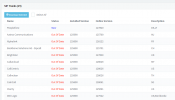
I have attached the screenshot for reference
After update the hotfix version from 450 to 461 in 3cx management console it's shows 29 SIP trunk update now.
can i update the patches or can i hold on?
 

Attachments

  • sip trunk.PNG
    sip trunk.PNG
    24.8 KB · Views: 9
Tick 'Select All' , then click on 'Download Selected'
 
  • Like
Reactions: NickD_3CX
It looks like upgrade went fine for you which I am very happy to hear.

I will be marking this thread as 'Solved', but if there is anything else you need, feel free to create a new thread on our forums!
 
Status
Not open for further replies.

Forum statistics

Threads
111,974
Messages
590,081
Members
164,899
Latest member
mazet