How block inbound callers from dialing extension number? How stop outside access to voicemail?

Status
Not open for further replies.

uptime1

Customer
Joined
Jan 13, 2012
Messages
182
Reaction score
59
What's the proper way to stop inbound callers from punching in an extension number while listening to the Digital Receptionist?

How can everyone, including employees, be blocked from listening to voice mail when outside the office?

Thanks!
 
Hi @uptime1,

Why not use a DTMF IVR? That'll not allow the dialing of internal extensions.

I don't believe that it is possible to block extensions from accessing voicemails only when outside of the office specifically I'm afraid.
 
Hi @uptime1,

Why not use a DTMF IVR? That'll not allow the dialing of internal extensions.

I don't believe that it is possible to block extensions from accessing voicemails only when outside of the office specifically I'm afraid.
Ok, but unsure what you mean by DTMF IVR. I have a bunch of DR's configured to announce options, like press 0 for receptionist, 1 for sales, etc., but callers are trying to end run and start punching in numbers hoping to get a live human or an executive, which is immediately unpopular with management. By default, it seems 3CX allows any extension numbers, Call Queue numbers and Ring Group numbers to be pressed in a DR. I'm open to suggestions.
 
Hi @uptime1,

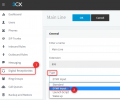
Go into your IVR's settings, change the type to DTMF. Enter in the options that are to be accepted. This should stop users from being able to smash buttons to find a human.
 
Hi @uptime1,

Go into your IVR's settings, change the type to DTMF. Enter in the options that are to be accepted. This should stop users from being able to smash buttons to find a human.
Ok, but unsure what you mean by DTMF IVR. There is no IVR setting in 3CX. There's Digital Receptionist, but no DTMF option setting in there, nor in a DR Extension. Exactly where is the IVR setting you suggest?
 
What version are you on?
 
Hi @uptime1,

Sorry, I neglected to include the words 'Digital Receptionist'. Yes, you can edit your Digital Receptionist Type to DTMF Input.

1645003742908.png
 
  • Like
Reactions: Evolute IT
Oh, wow! With what version did DR Type get options?
 
  • Like
Reactions: VasilisV_3CX
Hi @uptime1,

It was definitely added before v16, I don't remember exactly when. In any case, that should work for you!
 
  • Like
Reactions: Evolute IT
Status
Not open for further replies.

Forum statistics

Threads
111,974
Messages
590,083
Members
164,901
Latest member
Silent_Guru