How do I connect Huawei B315 VoIP account to 3CX?

Status
Not open for further replies.

Dennis Zitha

Joined
Apr 17, 2018
Messages
9
Reaction score
0
I have a a huawei B315s-22 with VoIP i would like the line to be connected to my 3CX PBX as a Trunk how do I go about it.

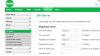
Below are the settings from the provider

2018_04_17_11_11_12.png

2018_04_17_11_14_10.png
 
From what I can gather, it is simply a 4G LTE router and simply provides internet access to devices. You would have to connect a device running 3CX to it , then sign up for a VoIP trunk account from a provider.

The images you attached, did not come through.
 
Hi the images are there now please check
 

Attachments

  • 2018-04-17_11-11-12.png
    2018-04-17_11-11-12.png
    34.2 KB · Views: 26
  • 2018-04-17_11-14-10.png
    2018-04-17_11-14-10.png
    14.5 KB · Views: 23
The device has VoIP/SIP
 
If the device has an integrated SIP device and the credentials have been provided, then, they could be moved over to 3CX as a Generic trunk.

However, you may have some problems if you are planning on running the 3CX server behind this router. The inbuilt ATA ports would have to be disabled to allow the ports normally used in the router (phone ports), to be used by 3CX. The router would also have to allow the forwarding of all of the required ports(see link) to the local IP of the 3CX server. I have seen problems trying to get this to work on similar routers, with inbuilt ATAs, from other manufacturers. I'm not saying it won't work, but it may take some tweaking to make it happen.

https://www.3cx.com/ports-used-3cx-phone-system-v14-v15/

I know nothing about that particular router, so i can't tell you if this is possible. Perhaps others on the forum have had some experience with that router.
 
If the device has an integrated SIP device and the credentials have been provided, then, they could be moved over to 3CX as a Generic trunk.

However, you may have some problems if you are planning on running the 3CX server behind this router. The inbuilt ATA ports would have to be disabled to allow the ports normally used in the router (phone ports), to be used by 3CX. The router would also have to allow the forwarding of all of the required ports(see link) to the local IP of the 3CX server. I have seen problems trying to get this to work on similar routers, with inbuilt ATAs, from other manufacturers. I'm not saying it won't work, but it may take some tweaking to make it happen.

https://www.3cx.com/ports-used-3cx-phone-system-v14-v15/

I know nothing about that particular router, so i can't tell you if this is possible. Perhaps others on the forum have had some experience with that router.


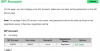
Thanks alot for the info i have attached the SIP Truck kindly advise if my parameters are correct.
 

Attachments

  • 2018-04-17_18-07-29.png
    2018-04-17_18-07-29.png
    12.6 KB · Views: 30
They look to OK, but a successfully registration will prove that to be correct. You should probably run the 3CX Firewall Checker to see that all passes before attempting to troubleshoot registration failures. If it all passes, then check the 3CX Activity Log if registration does fail. That may show why it fails and allow you to make changes

You may have to limit your concurrent calls on that trunk to one. Setting for 10 may be wishfull thinking unless you have confirmed with your provider.
 
I have tried to change concurrent calls to 1 but this is the error I am getting.

"SIP Server/Call Manager ID: 12293
Registration at Generic VoIP Provider has failed. Destination (sip:[email protected]:5060) is not reachable, DNS error resolving FQDN, or service is not available"
 
Here are the results of firewall checker
  • resolving 'stun-af.3cx.com'... done
  • resolving 'stun2.3cx.com'... done
  • resolving 'stun3.3cx.com'... done
  • resolving 'sip-alg-detector.3cx.com'... done
  • testing 3CX SIP Server... done
    • stopping service... done
    • detecting SIP ALG... not detected
    • testing port 5060... done
    • starting service... done
  • testing 3CX Tunneling Proxy... done
    • stopping service... done
    • testing port 5090... done
    • starting service... done
  • testing 3CX Media Server... done
 
IP 10.20.xx.xx is a private IP , not public. Are you using this on the same (I assume LTE) network that the router was/is working on? You won't be able to reach it from another internet connection.

Can you ping the your providers IP from the 3CX server? Did your provider supply you with the hardware to use with their service. Did you remove the settings from the router so that two devices are not attempting to register? What does that Activity Log show when a registration attempt is made, just that the IP is not reachable?
 
IP 10.20.xx.xx is a private IP , not public. Are you using this on the same (I assume LTE) network that the router was/is working on? No I am using a different network.You won't be able to reach it from another internet connection.

Can you ping the your providers IP from the 3CX server? Did your provider supply you with the hardware to use with their service. Yes they provided both SIM and Router Did you remove the settings from the router so that two devices are not attempting to register? The Router is currently disconnected completely. What does that Activity Log show when a registration attempt is made, just that the IP is not reachable?
You are using Unsupported SIP trunk providers which may cause issues.
For a list of supported SIP Trunks visit this page.
 
Unless the provider you are now connected to, is on the same network (probably the same provider), you will not be able to establish a connection with the private IP you were using with the Huawei router. The VoIP service they provided is only accessible when using their network.

If you have another device (USB data stick?), that accepts the SIM you were using in the Huawei, then plug that into a router (that accepts a data stick), then connect to 3CX, you might be able to make it work. the other possibility is to retain the original modem and connect the phone socket to a PSTN gateway that is set-up as a trunk in 3CX.

...or just order a VoIP trunk from another provider.
 
Last edited:
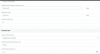
Thank you very much for the insight. I have taken screen shorts of my router interface. Is this router able to work as a VIOP Getway?
 
Thank you very much for the information. Just a straight forward question now regarding the attached router is it possible for this router to work as a VoIP Getway? see attached
 

Attachments

It's not a Gateway (defined as a device you would plug into a PSTN wall socket). It is an ATA (Analogue Telephone Adapter). It is meant to provide dialtone (48 volts/ringing) to a telephone set. If you want to use the lines coming from the back of the modem, and connect them into 3CX as a trunk, you will have to plug a gateway into the socket on the back of the modem.

Here are some examples of single line gateways...

http://www.grandstream.com/products...alog-telephone-adaptors/product/handytone-503

now discontinued but still available...

https://www.amazon.com/Cisco-SPA3102-Voice-Gateway-Router/dp/B000FKP55U

There are gateways available that support two, four, and more lines, but the cost increases as well. Not all are officially supported by 3CX.
 
Status
Not open for further replies.

Latest Posts

Forum statistics

Threads
111,885
Messages
589,545
Members
164,744
Latest member
johnblackwood1