how do you load 3CX v20 without a backup file?

mike1969

Premier Customer
Joined
Oct 16, 2024
Messages
3
Reaction score
1
I had a server fail i downloaded 3cx linux from portal. it happened to be v20 i downloaded. i do not have a backup file due to the server failure. when the new 3cx comes up it asks to (upload new configuration file created on 3CX) or Restore a Backup. i have a license key. how do you install a v20 system without a backup file.
 
i set up a free v20 system on the portal added it to my new server then went in and changed the license key to my new license key. seemed to work.
 
  • Like
Reactions: Guillaume Bourgeois
Normally, the process is quite simple. You just need to log in to your customer portal at customer.3cx.com, find your key, and click ‘install.’

This will allow you to generate a configuration file to upload, similar to what was generated for your trial version.

But in any case, if your solution works for you and the FQDN is not an issue, that’s great.
 
  • Like
Reactions: Evolute IT
Hi Thanks for the response. i couldn't find that info anywhere in the docs. I have 6 or 7 3CX that were all v18. i always did the legacy install and just added the key and programmed the system.i would like to read the exact procedure. I might be on the look out for a channel partner too and since you responded first you might be the guy.
 
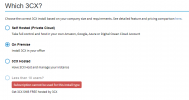
Start the installation

1729163305983.png

Select the installation type "On Premise"

1729163379292.png


Select your FQDN again (I notice its been deleted from the key)

Select your digit length

Enter your locale options.

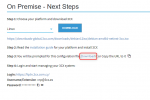
As you can see it is all done from here now. This will generate a configuration file which will be used to populate the data of the PBX.

You can download that from step 3.

1729163661096.png

Use that XML file to upload and within a few minutes your PBX will be installed, ready for you to configure it.

i do not have a backup file due to the server failure.

Always follow the 3 - 2 - 1 backup rule when deploying any type of server

3 Copies
2 Different Media
1 Offsite
 
  • Like
Reactions: fxbastler
Here is the procedure for installing on Windows:
https://www.3cx.com/docs/manual/phone-system-installation-windows/
Or on Linux:
https://www.3cx.com/docs/manual/installing-debian-linux-pbx/

What you need to focus on is the section “Upload config file.”

You can find more information about the config file content here:
https://www.3cx.com/docs/configure-pbx-automatically/#h.eg8xospb8q54

I might be on the look out for a channel partner too and since you responded first you might be the guy.

Are you located in Canada?

I only serve the Canadian market because the 3CX license price in Canada, when converted to USD, is significantly higher than the US prices offered on the 3CX website.:(

https://www.3cx.com/ordering/pricing/
I don’t have access to purchasing directly in USD.

Some Canadian partners choose to absorb the price difference, but I have chosen to focus solely on Canada.

I refer my non-Canadian clients to @ConceptsWeb, an excellent 3CX partner that operates beyond Canada, even though they are based in Canada.
 
  • Like
Reactions: Evolute IT
Is the only install method require a configuration file, or can we still install it the way we did for earlier versions?
 
Version 20 requires a configuration file generated from the config file generator at ;
https://install.3cx.com/?license=####-####-####-####
Where ####-####-####-#### is your license key.
Or, restore backup.


It’s going quite well, I like it. If you open the configuration file with Notepad++, you can further customize it.
This is a great opportunity for partners to create “templates” and ensure their configurations are automatically set up during the installation.

For example: SIP Trunk, Operator, IVR, system settings, etc.
 
  • Like
Reactions: Evolute IT
Is the only install method require a configuration file, or can we still install it the way we did for earlier versions?
For a fresh installation yes. For an existing configuration, you can use your backup file.
 
  • Like
Reactions: Guillaume Bourgeois

Members Online Now

Forum statistics

Threads
111,832
Messages
589,282
Members
164,662
Latest member
DejanMDS