


- Joined
- Jun 20, 2018
- Messages
- 24
- Reaction score
- 5
Hello,
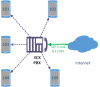
I've recently got started with 3CX. I've 5 extension on my 3CX PBX and I've manged to get a SIP Trunk. (As shown in the image). I've added the SIP trunk with the PBX and able to call any external PSTN/Cellular Phone operator. But the problem I'm facing is with incoming calls.
I don't know how to use the SIP trunk to forward calls to any of numbers as the external caller wishes.
i.e. caller can decide if he/she will call to 101, 102, 103, 104 or 105 and do it. No need to use any human operator to transfer the call. The caller will dial to 12345 as it is the number then after an prerecorded automated instruction he/she will dial any of the extensions to get connected automatically.
Thanks in advance
I've recently got started with 3CX. I've 5 extension on my 3CX PBX and I've manged to get a SIP Trunk. (As shown in the image). I've added the SIP trunk with the PBX and able to call any external PSTN/Cellular Phone operator. But the problem I'm facing is with incoming calls.
I don't know how to use the SIP trunk to forward calls to any of numbers as the external caller wishes.
i.e. caller can decide if he/she will call to 101, 102, 103, 104 or 105 and do it. No need to use any human operator to transfer the call. The caller will dial to 12345 as it is the number then after an prerecorded automated instruction he/she will dial any of the extensions to get connected automatically.
Thanks in advance


