Solved How to change Main Line on SIP Trunks

Status
Not open for further replies.

Dewayne Orender

Customer
Joined
Apr 5, 2022
Messages
21
Reaction score
3
1650377688508.png
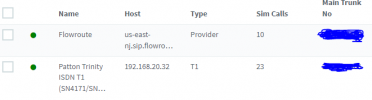
On the SIP trunks Main Trunk Numbers, I can not seem to change the Main Trunk No. Every time I do I get the following message.

1650377952294.png

I have tried to search for the error with no success. Any help or suggestions would greatly be appreciated.
 
So you want to change the main trunk number right?
 
Hi @Dewayne Orender

Are you trying to replace it with an existing DID of the trunk or with a brand new number?
 
I ended up finding my own answer. Found an Inbound rule that had the number. I deleted it, then changed the number to match the flow route. Then readded the inbound rule. I was having issues with the main number and almost caused more issues. Thanks. For some reason when I post, I almost always answer my own post immediately afterwards.

I will be working on my Fax with GrandStream next.... We will see how that goes.
 
Hi @Dewayne Orender

Are you trying to replace it with an existing DID of the trunk or with a brand new number?
Thanks, The two numbers I crossed out, the one in the flowroute was the original number. Thank you in advance for willing to assist.
 
Glad to see you were able to find the solution.
 
Status
Not open for further replies.

Latest Posts

Forum statistics

Threads
111,990
Messages
590,164
Members
164,926
Latest member
tohoken1