How to disable audio conferencing

Status
Not open for further replies.

Parslej

Forum User
Joined
Jun 16, 2021
Messages
62
Reaction score
18
I'd like to disable audio conferencing option for all users.
Just realized inviting too many people migt result usage all of available SC's

Is there any way to do that ?
Only similar option Ive found so far is 'Allow user to organize 3CX Webmeeting Video Conferences" but this seems to be more about web meetings and I believe this is not impacting SC's
 
I'd like to disable audio conferencing option for all users.
Just realized inviting too many people migt result usage all of available SC's

Is there any way to do that ?
Only similar option Ive found so far is 'Allow user to organize 3CX Webmeeting Video Conferences" but this seems to be more about web meetings and I believe this is not impacting SC's
You cannot disable audio conferencing, but just don't tell anyone about the 700 ext.

They can still do 3-parties conferences ad-hoc from the phones.
 
I might not tell them, but this option is available in both web & Windows client as key option set.
Only solution Ive found so far was changing confirmation mail to remove Conference ID or such…
What is not ideal / most elegant solution to me…

Side comment:
I can see very interesting features provided by 3cx which I love it, but licensing model forces increasing SCs costs over and over: mobile forwarding, simultaneous mobile ringing, audio conferencing requiring 2 licences per user etc
Overall I need double or triple SCs count vs I’ve assumed at the beginning ..
Other PBXes Ive used in past based more on users’ / functions licensing – what was easy to predict / plan, but not here
(Also 3cx doesn’t provide simple solution to monitor / alerting about SCs limit)
I might understand some rationale behind current 3cx licensing model and Im sure people can point some good aspects of that – but in this case it should at least allow to parametrize options client wants (or doesn’t) to use…
 
I can see very interesting features provided by 3cx which I love it, but licensing model forces increasing SCs costs over and over: mobile forwarding, simultaneous mobile ringing, audio conferencing requiring 2 licences per user etc
Overall I need double or triple SCs count vs I’ve assumed at the beginning ..
Other PBXes Ive used in past based more on users’ / functions licensing – what was easy to predict / plan, but not here
(Also 3cx doesn’t provide simple solution to monitor / alerting about SCs limit)
I might understand some rationale behind current 3cx licensing model and Im sure people can point some good aspects of that – but in this case it should at least allow to parametrize options client wants (or doesn’t) to use…
On the contrary. Per-SC is money-saving. Per-user, you would overpay for everything. Also, we usually keep a ratio of 3:1 for users:SC. I don't think you realize how many SC you really need and may be thinking you need a big ass license for nothing.

There is a notification that is sent by email (if enabled) to warn you when you reached the license limit, this way you can easily upgrade.

As for features, 3CX is full of them. Much more than many other PBXes for the price. While some of them cannot be disabled, like audio conferencing, it's still worth it. By the way, audio conferencing is very useful if you plan on using that feature. You may just need to trust the users to not use it for no reason. Anyway, if they are alone in the bridge, they use only 1 call.


I might not tell them, but this option is available in both web & Windows client as key option set.
Only solution Ive found so far was changing confirmation mail to remove Conference ID or such…
What is not ideal / most elegant solution to me…
Not idea but as I said above, why not trust that people won't use it... it's conferencing, they need people to use that. Alone? Doesn't matter.
 
Not sure if this will be much help at all, especially since you already mentioned using the 3CX Webclient and 3CX Windows App, however I'll leave this here in case anyone else wants something similar and is only using IP Phones:

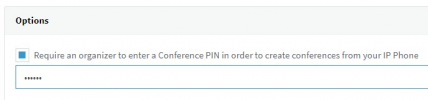
You can enable 3CX to require a PIN code for creating conferences by enabling the following option under "Settings >> Conferencing >> Audio":
1628498756725.png

However, enabling this will only force the user to enter a PIN if creating a conference by dialing conference extension 700. This means that the 3CX Clients cannot be controlled by this as they can create conference via the UI.

Example for an IP Phone:

• With "PIN" DISABLED you can dial 700 and then add a number as the conference ID.
Example: Dial 700, enter CONF_ID (eg 123456), a conference with ID 123456 will be created.

• With "PIN" ENABLED you will need to also enter the PIN when creating a conference by dialing 700.
Example: Dial 700, enter CONF_ID*PIN_NUM (eg 123456*123), a conference with ID 123456 will be created.
 
Thank you for your replay.
I'd love to leave this option enabled for selected users, or being limited only for people knowing PIN
However we using mostly SoftPhones, so mentioned option did not help that much
 
Status
Not open for further replies.

Forum statistics

Threads
111,980
Messages
590,104
Members
164,908
Latest member
FarizQasimov