How to disable or restrict access to 3CX web interface and cell phone app in v20

Status
Not open for further replies.

DemarestG

Gold Partner
Advanced Certified
Joined
May 29, 2020
Messages
13
Reaction score
0
We have a potential customer that wants to be able to control a users access to the web interface / app and also control if the user can provision on a smart phone with the QR code. Where can I find those settings in V20.
 
You can restrict access to the 3CX console via your firewall. Restricting clients is less obvious.
 
Less obvious like it can be done in some fashion or not at all? This client is a bank and will have about 300 users all inside of the firewall on their network. Where did the check box option that v18 had go that disallowed access to these features?
 
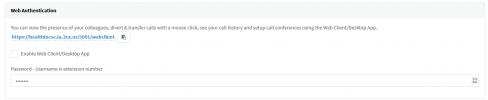
If you don't set a email address for the extension, it won't enable the webclient. Then the user can't scan a QR code....
 
Okay, I guess that makes sense but no option for a user to use the webclient, but not be allowed to use the cell phone app?
 
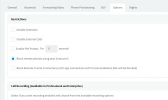
Even in v18 with the block remote tunnel option
1718052310105.png
It didn't block the apps. It just wouldn't transfer voice (if you forced voice over the tunnel).
SMS, presence, etc - all still worked.

The only way to really block it is to restrict ports 443/5001 and 5090 to only people you want.
 
1718053355484.png

This would have been nice to keep in v20 at least. I will stop whining now.
 
  • Like
Reactions: OlegR_3CX and bitn2
This option is important because we are still deploying clients with version 18 with desktop app that has the QR code, where the user easily connects their cell phone. How to block this?
 
@Ricardo.Monteiro you mean not to allow the 3CX Webclient/app to have the QR code option?
 
The thing is that you won't be able to remove the QR code from the Application itself, so it will be there and the user then be able to scan the code.
 
Status
Not open for further replies.

Latest Posts

Forum statistics

Threads
111,949
Messages
589,881
Members
164,842
Latest member
abdullah.alshehri@rewaa