- Joined
- Sep 6, 2016
- Messages
- 115
- Reaction score
- 28
Hi team,
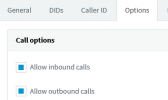
Is there any way to enable/disable a SIP Trunk independently? We have a scenario with 50 SIP Trunks at least and for testing we want to enable just one or two of them for incoming calls, but it's not possible, there is not a button to enable just one. Editing the rest is not a solution because it would take too much time and work, and exporting them is not also other solution because we cannot export all at once.
Any idea?
Regards,
Víctor
Is there any way to enable/disable a SIP Trunk independently? We have a scenario with 50 SIP Trunks at least and for testing we want to enable just one or two of them for incoming calls, but it's not possible, there is not a button to enable just one. Editing the rest is not a solution because it would take too much time and work, and exporting them is not also other solution because we cannot export all at once.
Any idea?
Regards,
Víctor