


- Joined
- May 14, 2020
- Messages
- 255
- Reaction score
- 17
Hi,
I have auto-provisioned my Fanvil X3S to 3CX. However, I realized that it is by default using UDP as the transport.
I did the following :
a. Login to the Fanvil X3S portal
b. The transport in Fanvil X3S is changed to TLS
c. The port is changed to 5061
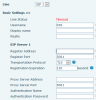
d. After the settings are applied, the result is "Timeout". Pls refer below.
Are there other settings need to configure ?
I have auto-provisioned my Fanvil X3S to 3CX. However, I realized that it is by default using UDP as the transport.
I did the following :
a. Login to the Fanvil X3S portal
b. The transport in Fanvil X3S is changed to TLS
c. The port is changed to 5061
d. After the settings are applied, the result is "Timeout". Pls refer below.
Are there other settings need to configure ?


