Yes exactly like that.
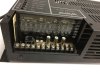
The amplifier drives the analog speakers but needs the adapter to provide the audio signal. (Many older legacy PBX would have analog page output terminal you would have wired to these amplifiers)
Get a paging adapter. (A few different brands to choose from so it often comes down to what your suppliers carry)
Cyberdata 011233, 011146, or 011171
Algo 8301 or 8373
SNOM pa1 (think this was end of life or made legacy not long ago)
Fanvil PA2
etc.
Wire it to the amplifier using the line out.
The officially certified devices are here under "Supported infrastructure devices":
https://www.3cx.com/sip-phones/
The adapter can be reached via a paging ring group extension number.
You use a multicast group if you are paging multiple devices in the same building. So if you have a bunch of desk phones that need to hear the same paging announcements you want a multicast group so all endpoints get the same stream of data broadcast at the same time and someone in the building doesn't hear mismatched audio. Probably for the purposes of troubleshooting you would start simply by adding the adapter to a traditional paging group and make sure it works and your wiring isn't messed up. Tuning the gain on amplifier and matching your analog speakers to it's output can be tricky. more of an art form/skill than you typically find in most IT tasks.
The official documentation for configuring that Cyberdata adapter is here:
https://www.3cx.com/support/configuring-cyberdata-devices/
any of the units I listed that are not currently supported generally are not too difficult to get working if you have a reasonable understanding of SIP and multicast protocols.
One tip. I use mostly Yealink phones and I almost always have to modify the default template to enable reasonable Multicast paging settings but that's a separate topic. (also separate is the fact 3cx does not provide a very good set of defaults for multicast paging on Yealink or do the sane thing and expose the priority settings as a configuration option.)