How to make app show which DID?

Tedra

SMB User
Joined
Jun 24, 2025
Messages
27
Reaction score
6
I have two trunks each with one DID number. I want the phone app to show which DID number the incoming call is on. I found instructions that say Edit Trunk -> DID tab, add DID number and give it a label. Then the label will appear with the incoming call number. I can add the inbound but it doesn't provide fields for Name or Assigned To. If I save and come back it is erased.
 
Hi,

Add the DID under trunk:
- Click the save icon for the number
- Click the blue Save button on top to confirm DID edits.

Go to extension/call handling and assign the DID.
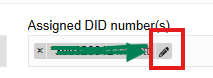
- Click the pencil icon to add a name.
- Click the blue Save button on top to confirm the extension edits.
 
Last edited:
Hi,

where you add the DID, edit the name with the Pencil
1750746400969.png

Paulo
 
I did this:
Voice & Chat -> choose trunk -> DID Numbers
Added the DID number by typing it in. Blue Save button.

Call Handling -> General -> Assigned DID numbers(s)
Added the DID from the drop down box. Blue Save button

Went back and looked at
Voice & Chat -> choose trunk -> DID Numbers
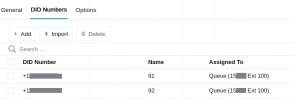
Now has "Assigned To" Queue (xxxxx Ext xxx)
where x=digit
The Name field is blank but not editable. Where is it set?

---

I also tried this.
Voice & Chat -> choose trunk -> Options -> Reformat inbound or outbound caller ID
Inbound, attempted to prepend a '0' to the inbound Caller ID for this trunk

Priority | Source Pattern | Replace Pattern
1 (.*) 0\1

This did not work either.
 
Call Handling -> General -> Assigned DID numbers(s)
Added the DID from the drop down box. Blue Save button
1750747881253.png
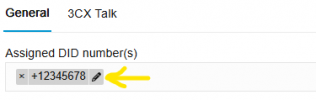
Use the pencil icon to give it a name, then click blue save again.
 
Paulo, I found it and added it. The number I used appears between the DID and the pencil. Saved it. But still the phone only shows the original caller ID while ringing. Also it is not in call log history.
 
It will also depend on the phone, how it reads the info, and on any other reformating that might be happening.
 
Also same in the call history in the 3CX web client on a PC. Original inbound number but no Name of that extension.
 
Hi Tedra,

If the trunk receives a call with a DID it will ALWAYS take the name, but ONLY if the DID did match.

You have mentioned that you have only one number, so that is the Trunk Main number and you did not ADD any extra number to the DID list, correct?
The trunk will have a 'default route', please read... does not care what DID, it will ALWAY go here if no match.

So if the DID did not match, the call will still work, but if there is no name on the Call, that means the DID dit not match.
Please correct the DID EXACTLY like the provider does send it on the trunk.

I do hope this information does help you get the name of the DID number.

Paulo
 
  • Like
Reactions: VoIPTools and Saky
The provider trunk number is the same for both trunks except there is a 3 digit extension added to the end of the number on each trunk. Then there is the public number that a person would dial. I assume this is the DID number. The original trunk number, and the public number for this trunk, I have added to both of these numbers the 2 digit number for the name using the pencil. Saved it. But still does not show in caller ID phone or web client. Then I tried removing the public number so now only the original trunk number/extension, plus the pencil name. Still didn't work.
 
Hi,

so, no match between (number dialed) the DID send by your provider, and the DID you have put in the 3CX.
The DID can have +39.. or 0039.. or 39... or no country just 2345678 (example).
You will need to find out what is send to you by the provider.

Paulo
 
Who is your provider? Maybe someone else is using the same and can help you with the number format.
 
I believe I have this set up correctly to show the name I set (91 or 91) with the associated DID number. Voice & Chat -> DID Numbers
3CX_DIDnumbers.png
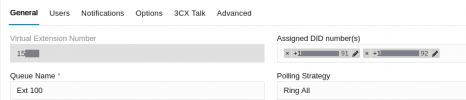
Call Handling -> General
3CX_editqueue.png

But the Caller ID I still does not also include the name of the number the caller called.
The SIP provider support said, "we are unaware of how the 3CX Startup Platform handles determining where to pull Caller ID information from within an INVITE packet. Originally, this kind of modification could be done within the Inbound Parameters tab of your trunk configuration"
 
HiTedra,

I would guess that in your SIP Trunk - General tab the Default route has been set to Queue 'Ext 100' ??? can you check?

1751010422761.png

Paulo
 
Last edited:
Hi Tedra,

So just to be clear on this.

You have 2 DID numbers on the SIP Trunk that are set on a QUEUE with a name added to the DID's.
The SIP Trunk has a default route to an Extension.

When you call one of the DID numbers, the call will go to the QUEUE, you have confirmed this by checking the CDR details, or the call will go to the extension directly?

Paulo
 
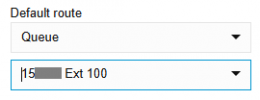
The default route is set to User. Below that is another field with my name and an extension number. The extensions of the Queues (in Call Handling tab) are different extension numbers than the extension in default route.

Which Reports (under blue box My Reports) should I look at to answer your second question?
 
Hi,

So the external calls will ring the queue or the extension that is not part of the queue?

Paulo
 
Yes that seems like it.

If I change default route to a queue, then it wants me to choose a particular queue. Does that mean I should delete one queue, have one queue with both DIDs, and point the default route to that queue?
 
Hi,

So the external calls will ring the queue or the extension that is not part of the queue?

Paulo
 

Forum statistics

Threads
111,974
Messages
590,083
Members
164,900
Latest member
Silent_Guru