How to notify extensions that are members of a call queue that there are waiting callers

Status
Not open for further replies.

hostcake

Free User
Joined
Oct 25, 2021
Messages
17
Reaction score
3
My customer has two handsets on their reception counter that are members of an incoming call queue. Callers are placed on hold by the queue while waiting however the destination extensions if already on a call have no idea that there is someone in the queue waiting (unless they hang up their live call and their extension rings again).

They have asked if either:

1. the system can play a call waiting tone in which case they can elect to park their active call and presumably pickup the next caller in queue
2. have a BLF notification that notifies of unanswered callers in the queue.

They previously had Grandstream PBX which lit up a BLF when there were people still waiting in the queue.

It does seem like a very basic and reasonable request but I have had no luck finding a simple answer to it within the 3CX doco or forums etc. I'm a newbie so maybe I have missed an important concept around how 3CX processes call queues. (I already made sure the extensions are members of a group with permission to perform operations (pickup etc) and park calls etc.


3CX Version, Professional 16.0.8.9
Server OS, Debian
Is the 3CX Server Hosted and where? Hosted by 3CX Reseller
IP Phone Make/Model/Firmware version, Grandstream GXP2160
Provisioning Method: SBC
Trunk Provider or VoIP Gateway Make/Model, NetVault SIP Trunk
Has the Firewall Checker passed: YES
Are custom Phone Templates being used: NO

Suggestions and advice welcomed!
 
Having an IP Phone get notified of calls waiting in a Call Queue is not possible. You can however use the 3CX Webclient or Windows App if the users also have PCs. Calls waiting in a Call Queue can be viewed in the 3CX Switchiboard available in the Webclient or Windows App:
1637135273410.png

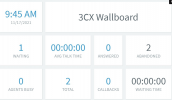
Alternatively, you can use the 3CX Wallboard which again is available in the 3CX Webclient or 3CX Windows App for a general overview of the Call Queue:
1637135320726.png
 
Having an IP Phone get notified of calls waiting in a Call Queue is not possible. You can however use the 3CX Webclient or Windows App if the users also have PCs. Calls waiting in a Call Queue can be viewed in the 3CX Switchiboard available in the Webclient or Windows App:
View attachment 25888

Alternatively, you can use the 3CX Wallboard which again is available in the 3CX Webclient or 3CX Windows App for a general overview of the Call Queue:
View attachment 25889
Thats a useful suggestion Chris - thanks. If I install the Windows app can it be set to NOT output audio and also auto popup when there are incoming calls (otherwise I imagine the user has to keep the 3CX app on top of their active windows)
 
If I install the Windows app can it be set to NOT output audio and
Since it's going to be running on a Windows PC I guess you could simply lower the volume for that specific app to 0%. If you'll be using the webclient you could mute the tab.

auto popup when there are incoming calls (otherwise I imagine the user has to keep the 3CX app on top of their active windows)
Even though the Windows App will pop-up upon an incoming call, the switchboard will not, plus, there will not even be an incoming call as I assume the scenario you are talking about is for when the agents are busy and hence not receiving any new incoming calls.

Instead of using the same extensions on the PCs, you could use an extension that's configured as that Call Queue's manager. That way, it will never ring as it's not actually a member of the queue but can still monitor the Queue's wallboard. That said, you'll still probably need a dedicated monitor for the Wallboard as there would be no way to automatically bring it up whenever there's a new call waiting in Queue.
 
@ChrisC_3CX has offered the best out-of-the-box options I can think of. But there are some other options if you want to look at custom programming.

It is possible to subscribe to 3CX events using the 3CX Call Control API. You could, for example, monitor the queue extension and when a new call has been waiting in the queue for X seconds, you could play a tone through the PC speakers, or display a popup, or perform a overhead page, or even barge into an existing phone call and play a call waiting beep.

I encourage you to take a look at our 3CX Queue Notifier tool. Today, this tool monitors queues and performs a page when a call has been waiting in the queue longer than the threshold you specify, or more callers are waiting than permitted. And we could add some of the other notification methods mentioned above if needed.
 
It would be really nice if 3CX could natively have either call waiting tones or a visual notification as this seems (judging by the many forum posts I have looked at over the past day or so) a very requested feature. In the absence of that though I wonder if it is possible to install the Google Chrome extension and login to the queue extension number? If that can be done at least that would generate a visual popup box for incoming calls. I dont think continuously visually monitoring the wallboard is workable especially when staff are busy dealing with customers etc. But a visual popup box would be better than nothing. Can this be done?
 
Status
Not open for further replies.

Forum statistics

Threads
111,975
Messages
590,084
Members
164,901
Latest member
Silent_Guru