How to re-register my FQDN?

Status
Not open for further replies.

Razva

Free User
Joined
May 7, 2017
Messages
41
Reaction score
0
Hey,

I've moved my 3CX server to another node and IP.

I've also released the `hostname.3cx.com` FQDN from the Customer Panel.

How can re-register the FQDN to the new IP?

Thank you!
 
Has your license changed too?

If not, you didnt need to release the FQDN.

Your move should have been as simple as backing up and restoring your PBX
 
Has your license changed too?

If not, you didnt need to release the FQDN.

Your move should have been as simple as backing up and restoring your PBX
Yeah, I realize that now. What can I do at this point?
 
You could backup your 3CX without the licensing information and then do a restore. During which you'll get to enter your product key and pick the FQDN again (providing its available). Otherwise, it might auto detect the FQDN already assigned if youre lucky.
 
You could backup your 3CX without the licensing information and then do a restore. During which you'll get to enter your product key and pick the FQDN again (providing its available). Otherwise, it might auto detect the FQDN already assigned if youre lucky.
I don't mind changing the FQDN as well. I basically don't know how should I reassign a FQDN.
 
Backup your PBX without your license info, restore PBX to new machine and put your license key in.

It will prompt you for new FQDN if one is not assigned to it already.
 
Backup your PBX without your license info, restore PBX to new machine and put your license key in.

It will prompt you for new FQDN if one is not assigned to it already.
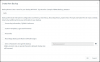
Did this (attachment) and then restored. I wasn't asked for the license key. Any hints?
 

Attachments

  • 2020-06-30_19-44-29.png
    2020-06-30_19-44-29.png
    48.9 KB · Views: 30
Did you do a fresh install on your new machine?
 
At this point I dont know what you're trying to acheive.

Backup 3CX without FQDN/License key option (Old location).

Restore 3CX (New location).

Trash your VM after the backup if you are reinstalling on this VM - Assuming youre using Debian ISO - Download that, boot to it (as if youre doing a fresh install) then restore the backup when it asks if you have one.
 
At this point I dont know what you're trying to acheive.

Backup 3CX without FQDN/License key option (Old location).

Restore 3CX (New location).

Trash your VM after the backup - Assuming youre using Debian ISO - Download that, boot to it (as if youre doing a fresh install) then restore the backup when it asks if you have one.
What I was doing was making a full dump of the old VM and restore it on the new node. I'm not making a fresh install, but I've restored the entire VM with the full setup to a new node.
 
Ok now I get what you've done.

Have you done a license refresh at your new location?

im not sure how to recover your FQDN other than a reinstall/restore unless 3CX Support are willing to intervene and sort you out.
 
Have you done a license refresh at your new location?
Nope, I guess that's why this didn't worked out... [facepalm] Can you please let me know how can I refresh it?
 
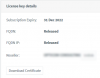
Later edit: I did the license refresh but the FQDN still appears as "Released" on the Customer Panel.
 

Attachments

  • 2020-06-30_20-01-29.png
    2020-06-30_20-01-29.png
    17.4 KB · Views: 12
if you have released the fqdn, the only solution is to

1. backup without license key and fqdn. Move the backup file to a location outside of 3cx folder I.e local machine

2. Rebuild 3cx / uninstall 3cx

3. Restore 3cx using the backup file from step 1, it ask you for license key and fqdn to use
 
Status
Not open for further replies.

Forum statistics

Threads
111,864
Messages
589,455
Members
164,703
Latest member
eokwaro