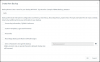
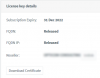
Yeah, I realize that now. What can I do at this point?Has your license changed too?
If not, you didnt need to release the FQDN.
Your move should have been as simple as backing up and restoring your PBX
I don't mind changing the FQDN as well. I basically don't know how should I reassign a FQDN.You could backup your 3CX without the licensing information and then do a restore. During which you'll get to enter your product key and pick the FQDN again (providing its available). Otherwise, it might auto detect the FQDN already assigned if youre lucky.
Did this (attachment) and then restored. I wasn't asked for the license key. Any hints?Backup your PBX without your license info, restore PBX to new machine and put your license key in.
It will prompt you for new FQDN if one is not assigned to it already.
Nope, on the same VM.Did you do a fresh install on your new machine?
What I was doing was making a full dump of the old VM and restore it on the new node. I'm not making a fresh install, but I've restored the entire VM with the full setup to a new node.At this point I dont know what you're trying to acheive.
Backup 3CX without FQDN/License key option (Old location).
Restore 3CX (New location).
Trash your VM after the backup - Assuming youre using Debian ISO - Download that, boot to it (as if youre doing a fresh install) then restore the backup when it asks if you have one.
Nope, I guess that's why this didn't worked out... [facepalm] Can you please let me know how can I refresh it?Have you done a license refresh at your new location?
Founded in 2005, when VoIP was an emerging technology, 3CX has gone on to establish itself as a global leader in business communications.