How to set 'office hours' on a line by line basis?

Status
Not open for further replies.

warwick.schaffer

Customer
Joined
Jan 26, 2022
Messages
5
Reaction score
3
We have a situation with different staff members in different time zones and some part time. I can see how to set 'office hours' overall but not on an individual basis. We want phones to ring in working hours for people but not after.

Put another way we want each user to be able to set the hours they are available and when not. There is not enough consistency between staff to be able to apply general rules.
 
Last edited:
Last edited:
  • Like
Reactions: Evolute IT
Office hours can be set globally or at each sip trunk , ddi number
You can set Office hours per extension too, but, all office hours do for extensions is affect their profile status if Autoswitching is on. So I'd recommend also looking into what @Saqqara mentioned:
You may be able to use extension autoswitch function to control calls https://www.3cx.com/docs/manual/pbx-extension-management/


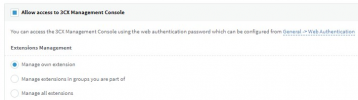
You can give the extensions access to the Management Console and specifically only the "Manage own extension" right so they can edit their working hours as they please:
1645612871157.png
 
  • Like
Reactions: Evolute IT
Status
Not open for further replies.

Forum statistics

Threads
111,974
Messages
590,083
Members
164,901
Latest member
Silent_Guru