How to upgrade to v18

Status
Not open for further replies.

KaterinaK_3CX

Joined
Feb 24, 2016
Messages
246
Reaction score
36
This is a quick cookbook on how to upgrade your 3CX v16 to v18. Check your license, and if you are running on Linux, an OS upgrade to Debian 10 will apply while upgrading to V18. V18 has many advantages over older versions including new features such as Teams integration, new Web Client and Windows Desktop App, as well as many security improvements over older versions.

Read the guide.
 
Last edited:
when windows version supposed to release
 
when windows version supposed to release
It will be at least 2-3 few weeks from now, no hard ETA I can share though.
 
It is a shame that the description of the Windows upgrade to V18 was so brief and didn't both to mention that V18 need to run on Windows Server 2016 or later.
 
It is a shame that the description of the Windows upgrade to V18 was so brief and didn't both to mention that V18 need to run on Windows Server 2016 or later.
Hi!

Whenever installing a new Major Version, you should always check the revised installation instructions in the manual:
https://www.3cx.com/docs/manual/phone-system-installation-windows/

Especially for Windows where you cannot upgrade seamlessly to the new major release (Service Packs can be of course), this is important.
 
  • Like
Reactions: Evolute IT
Moderation removed my last post without appreciating the context.

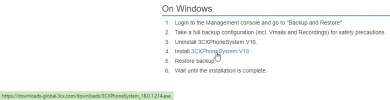
The link in the article should be changed from linking directly to an old version to using the always up-to-date link http://downloads.3cx.com/downloads/3CXPhoneSystem18.exe

Because you're right, people will click the link, and as it stands right now it is linking to an old version.
1637955011716.png

Regards,
 
  • Like
Reactions: NickD_3CX
Moderation removed my last post without appreciating the context.

The link in the article should be changed from linking directly to an old version to using the always up-to-date link http://downloads.3cx.com/downloads/3CXPhoneSystem18.exe

Because you're right, people will click the link, and as it stands right now it is linking to an old version.
View attachment 26188

Regards,
Thanks for pointing that out! I will get our marketing team to change it!. :)
 
  • Like
Reactions: Brodie Giesbrecht
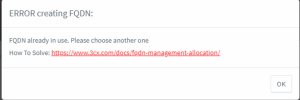
During our upgrade we get the message Your FQDN is already in use, however if you follow the instructions on how to resolve the issue there is no way to release the FQDN in the customer portal. In the installation instance in the customer portal the FQDN is blank and there is no option to do anything. We tried all installation options to resolve but to no avail.


Screen Shot 2022-10-20 at 11.36.55 am.png
 
During our upgrade we get the message Your FQDN is already in use, however if you follow the instructions on how to resolve the issue there is no way to release the FQDN in the customer portal. In the installation instance in the customer portal the FQDN is blank and there is no option to do anything. We tried all installation options to resolve but to no avail.


View attachment 32452
If the fqdn is released on your subscription, and your backup contains the license key and fqdn data then trying to restore and receive this error, it is likely that the fqdn is now bound to another subscription.

If installing as a new machine, choose a new fqdn.

If in doubt, contact our CSR team to check your subscription by emailing [email protected], or using the chat feature from our website:https://www.3cx.com/
 
Last edited:
  • Like
Reactions: Evolute IT
Status
Not open for further replies.

Forum statistics

Threads
111,974
Messages
590,081
Members
164,899
Latest member
mazet