How to use 3CX with Spectrum PRI

Status
Not open for further replies.

busyfritz

Forum User
Joined
Aug 15, 2019
Messages
5
Reaction score
0
Hi all,
I'm an IT admin at a small company. We're dissatisfied with the Mitel 5000 solution that we have right now and I'm looking at moving to 3CX.

I'm new to the telco space and how things work in it. Hopefully someone here can point me the right way.

Currently I'm looking at:
Replace our phones with Yealink T48G phones
Replace our 5000 box with a on-prem 3CX solution

We're locked for another year and a half with a Spectrum so I would like to use their voice trunk. Here are the details:
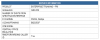
11900

and here is a link to their network specs: https://enterprise.spectrum.com/con...ne/SE-TS-TS002_v2-Enterprise-Trunking-PRI.pdf

Here is where I don't know what to do next. How do I connect the 3CX box to Spectrums PRI?
 
Patton smartware models were historically supported by 3CX but most variants are no longer produced.

As @cobaltit has already noted the later Trinity models have now been added to the portfolio in the Alpha release that came out last week (the full release I hear should be with us in September).

The Patton model you are looking for, for PRI (E1/T1 dependent on where you are located in the world) is purely dependent on how many lines you have:

Single PRI SN 4171: https://www.patton.com/voip-gateway/sn4170/
Or more Enterprise 4970A: https://www.patton.com/voip-gateway/sn4970/

Also confirm the line type you have, these models support EURO ISDN (RJ45 - like connector/line) where some older (un-supported) lines (like DASS 2 here in the UK) are presented as BNC connectors and will require a converter.

NOTE: Yealink T48G phones are now EOL and have been surpassed by the Yealink T48S models with OPUS support.
 
Before purchasing a gateway I would suggest looking into having Spectrum change your hand off from PRI to SIP. This will simplify your configuration and keep the high call quality your used to. At least here in my area nobody sells SIP trunks with a better value. If you're already getting Internet from them then the SIP add on is $120 for 8 channels. Voice does not traverse the Internet so no potential latency issues to worry about.
 
Before purchasing a gateway I would suggest looking into having Spectrum change your hand off from PRI to SIP. This will simplify your configuration and keep the high call quality your used to. At least here in my area nobody sells SIP trunks with a better value. If you're already getting Internet from them then the SIP add on is $120 for 8 channels. Voice does not traverse the Internet so no potential latency issues to worry about.

Ok I like the sound of that option.

I'll let you know how they respond.
 
NOTE: Yealink T48G phones are now EOL and have been surpassed by the Yealink T48S models with OPUS support.

I thought the only difference was that the T48S is a Skype edition? The website doesn't say anything about EOL.
 
No T48S is not a Skype edition but it is certified for use with Skype/Teams. Basically it's a re-release of the T4x phones that use a unified firmware so you definitely want those instead of the T48G models. Regarding switching the interface, there's two potential issues with that:

  • They may want to extend/renew the contract with the interface change.
  • You are all-in on. With keeping the PRI, you can unplug it from your Mitel box and plug it into the Patton and if things don't work as expected, you can plug it back into the Mitel box and everything works. You can also do the switch anytime you want. If you switch the interface, it's generally going to happen during business hours for Spectrum and unless you already have licenses for SIP for the Mitel you are committed.
 
  • Like
Reactions: CentrexJ
No T48S is not a Skype edition but it is certified for use with Skype/Teams. Basically it's a re-release of the T4x phones that use a unified firmware so you definitely want those instead of the T48G models. Regarding switching the interface, there's two potential issues with that:

  • They may want to extend/renew the contract with the interface change.
  • You are all-in on. With keeping the PRI, you can unplug it from your Mitel box and plug it into the Patton and if things don't work as expected, you can plug it back into the Mitel box and everything works. You can also do the switch anytime you want. If you switch the interface, it's generally going to happen during business hours for Spectrum and unless you already have licenses for SIP for the Mitel you are committed.

Thanks for clarifying that about the phones. That helps.

Those exact things crossed my mind. But am I right that I'm several months out until 3CX officially supports the new firmware?
 
Maybe 2 months. But Patton directly supports the gateways and provides templates so that shouldn't be that much of an issue. And there's always used ones if you don't have that much longer on your contract.
 
Ok, I'm a bit confused as to how the software support works. I thought the templates were a 3CX thing? So if I buy a new one in the next month or two, I can count on 3CX and Patton to pull their act together and have a working gateway? I know how software dev works and that's hard to get exact, but my target is about 2 months.
 
The templates are just pre-configured settings to work with a trunk or device (Patton Gateway in this case). You can put the exact same settings into the Generic SIP trunk template and it will work exactly the same but it will be marked as 'unsupported'. The 3CX provided templates are marked/signed some how for that flag but that's it. Typically the manufacturer provides the templates to 3CX, they test them and if they are happy, include them. So If you had to go live today you can use a Generic SIP trunk with Patton guidance or use the template from Patton and things will work, it will just be flagged as 'unsupported'. Given the typical development time for 3CX Update 3 which is currently in alpha should be final in your time frame of 2 months. But even if it isn't, you are still covered by Patton which in this particular case is probably a better source of support anyways.

https://support.patton.com/index.ph...tton-trinity-smartnode-configuration-with-3cx
 
To add clarity to the points above:

Patton smartnodes come in two forms.

The legacy devices running the Smartware operating system which can be found here.
https://www.3cx.com/voip-gateways/ these are to my knowledge no longer produced.

To be added next month (and already available in the ALPHA release last week) will be the newer Trinity OS smartnode templates - supported models include: SN 4970A, 4171, 4131, 4141 FXO, 4141 FXS

I have been using these models with 3CX since release with the templates provided here:
https://support.patton.com/index.ph...tton-trinity-smartnode-configuration-with-3cx

I have never had any issues, they should be fully released next month in the next SP release but if you want to get your device earlier I would simply strip the templates from an ALPHA release (they should be no different ) and use them in a full release (do not use ALPHA/BETA in live environments).

Ensure also that you have the latest firmware (this is what 3CX supports) Trinity 3.16.0 and can be found here: https://www.patton.com/support/upgrades/

FYI the PRI models can come with some neat little features such as high precision clock and B2BUA.
 
Status
Not open for further replies.

Forum statistics

Threads
111,933
Messages
589,810
Members
164,808
Latest member
jsbjsb