Htek 942 Audio Issues on Speaker Phone Firmware Update 2.0.4.8.9 on 3CX Pro V.16.0.655

Status
Not open for further replies.

Printcnx

Customer
Joined
Oct 8, 2009
Messages
19
Reaction score
0
3cx recommended firmware update for our Htek Phones Htek 942 seems to have caused the audio on speakerphone to be very quiet. Seem like the microphone sensitivity has been turned down?

Audio through handset is crisp and clear.

Audio from handset to speaker phone seems to work great leading me to believe that the mic sensitivity has changed.

Any thoughts on how to fix would be greatly appreciated.
 
Hi,

I tested a 924E (before and after upgrade) and it does not seem to make much of a difference.

Can you tell us what version is your PBX currently and if you are using custom templates?
 
PBX is running 3CX Pro V.16.0.655
Phones are running 2.0.4.8.9

We had a custom template to fix ring tone issue we had previously.
Seems like the update removed the custom template as I'm not seeing it under setting / templates.
 
In this case, please reset 2 phones, then go to their extensions and remove any devices that may appear under their Provisioning tab, and then go back to the Phones section and provision them normally.

Once they are up and running, make a few calls between those two extensions and check the phone performance.

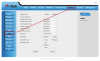
Also just FYI, the phone UI has some settings to adjust the volumes individually, although by default we leave those as is. Perhaps in your previous custom template you had changed those values and now they just defaulted?

1601991924666.png
 
Hi there thanks for the info.

The only thing we changed on the custom provisioning was the default ring tone which was very shrill.

I've changed some of the decibel levels all +6 with only a marginal improvement on the phones Web UI.

Starting to think that HTEK is not a great phone pairing with 3cx due to the continued issues we've had with them with 3cx updates.

I'm not seeing the custom provisioning template since the latest 3cx update. Is it possible that that would get deleted or merged with the default?

Was thinking my next step would be to delete and reload the provisioning template. Not sure if there is documentation on this.

Thanks!
 
Custom templates are retained when made this way https://www.3cx.com/docs/custom-ip-phone-templates/ but if you modified the files of the PBX directly, those will not be retained during updates. (this is bad practice and must be avoided).

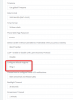
The best way to select another ring tone is via Management Console > Extension > Provisioning

1602685357578.png

Then simply reprovision the phones from the "Phones" page and they should automatically use this ringtone from now on regardless of updates.
 
Status
Not open for further replies.

Latest Posts

Forum statistics

Threads
111,964
Messages
590,008
Members
164,870
Latest member
nizammoktar