


- Joined
- Sep 17, 2019
- Messages
- 61
- Reaction score
- 15
Banging my head against this issue with HTEK Firmware and 3CX
Having an issue with updating firmware through 3CX console. The issue here is that I think the wrong firmware is downloaded by 3CX which are not usable by the phone we are using.
I have had contact with Tiptel NL about the firmware and it seems that when the phones have DSP Patch x.x.x.xM (M version) the normal firmwares which are downloaded are not loaded/usable
After some research and looking at the provision link in the Phones the wrong firmware is indeed downloaded and stored @ /var/lib/3cxpbx/Instance1/Data/Http/Interface/provisioning/xxxxxxxxxxxxx/firmware/htek
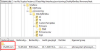
So in my case I have HTEK 903 and an HTEK924 which both have DSP 9.0.3 (Patch 1.0.16M) The M Version
For that I need the M firmware files.
If i download the firmware from HTEK I get both the "normal" fw and the "M" fw.
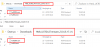
As for testing: I have put the right firmware (M version) file manually in the provisioning/xxxxxxxxxxxfirmware/htek folder and when clicking Firmware upgrade in the 3CX console it worked.
I don't want to put each new FW in the folder on the server the let these phones get their FW upgrades, nor do we want to manually upgrade them.
- 3CX Version, Professional Annual 16.0..493
- Server OS, Debian 9
- Is the 3CX Server Hosted and where? Local Network
- IP Phone Make/Model/Firmware HTEK 903 and 924 (DSP Patch with M)
- Provisioning Method: Local
- Trunk Provider or Gateway Make/Model: Keensystems
- Has the Firewall Checker passed: YES
- Are custom Phone Templates being used: NO
Having an issue with updating firmware through 3CX console. The issue here is that I think the wrong firmware is downloaded by 3CX which are not usable by the phone we are using.
I have had contact with Tiptel NL about the firmware and it seems that when the phones have DSP Patch x.x.x.xM (M version) the normal firmwares which are downloaded are not loaded/usable
After some research and looking at the provision link in the Phones the wrong firmware is indeed downloaded and stored @ /var/lib/3cxpbx/Instance1/Data/Http/Interface/provisioning/xxxxxxxxxxxxx/firmware/htek
So in my case I have HTEK 903 and an HTEK924 which both have DSP 9.0.3 (Patch 1.0.16M) The M Version
For that I need the M firmware files.
If i download the firmware from HTEK I get both the "normal" fw and the "M" fw.
As for testing: I have put the right firmware (M version) file manually in the provisioning/xxxxxxxxxxxfirmware/htek folder and when clicking Firmware upgrade in the 3CX console it worked.
I don't want to put each new FW in the folder on the server the let these phones get their FW upgrades, nor do we want to manually upgrade them.


