Hubspot Intregation - Test contact working but no call journalling

Status
Not open for further replies.

phoebe

Free User
Joined
Nov 22, 2023
Messages
4
Reaction score
0
Hi I've recently followed the guide to set up 3CX Hubspot Intregration.

I believe I have followed the steps exactly and when I've tried searching for a number using the test function the record is found.

But nothing is populating in Hubspot with regards to call journalling.

Really stuck - is there anything I need to do that is not mentioned in the guide?

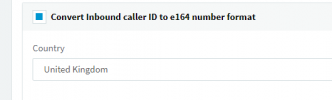
I've been testing with my own number in a e164 format (logged in hubpsot) and set up the SIP trunk to convert inbound caller IDs.
1700652086230.png
 
Hello @phoebe,

First, check that you can see the contact name and URL (CRM link) in the Web Client when you receive a real call from this number. Sometimes you get a successful response using the Test button, but for real calls you don't have a contact match due to number formatting.....

Once you confirm that the contact is being matched, if you still don't see the activities created in HubSpot, then you need to check the 3cxSystemService.log file in verbose mode. There you have all the interactions between 3CX and HubSpot.
 
Hi Ernesto,

Thanks for the reply. The contacts don't appear to be matching.

The format in hubspot appears to be "+44 XXX XXX XXXX" but in 3cx it is "+44XXXXXXXXXX", do the spaces or gaps impact the matching?
 
Hi Ernesto,

Thanks for the reply. The contacts don't appear to be matching.

The format in hubspot appears to be "+44 XXX XXX XXXX" but in 3cx it is "+44XXXXXXXXXX", do the spaces or gaps impact the matching?
Yes, you should use HubSpot new formatting tool which will ensure that it is stored as E164 (without spaces or dashes or anything), which will make the lookup work.
 
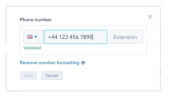
I believe it is that tool that seems to be adding the spaces? If I try remove it says unvalidated and won't allow me to save the number.1700757524050.png
 
If I used the 3cx caller id reformatting would this work?

+44(XXX)(.)(XXX)(.)(XXXX) = source pattern
replace pattern = +44/1/3/5
 
I believe it is that tool that seems to be adding the spaces? If I try remove it says unvalidated and won't allow me to save the number.View attachment 38341
If you save it with this tool, it will appear formatted but it is stored as E164 in the backend.
 
Status
Not open for further replies.