Hyper-V Instalation Issues

Status
Not open for further replies.

Jonathan Nicolau

New User
Joined
Oct 3, 2021
Messages
4
Reaction score
0
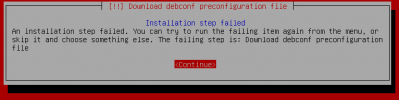
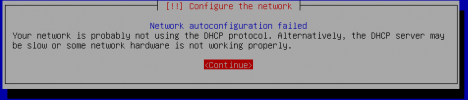
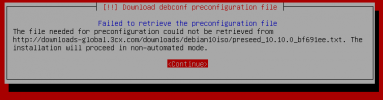
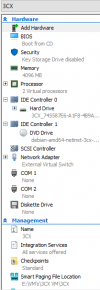
Hello, When I tried to install 3CX on Hyper-V running on a Windows 10 Pro system, it can not download the pre config file, but it's connected to the internet. Below you will see images of errors and an image of my VM settings. Help!
 

Attachments
  • 3cx System Settings.png
    3cx System Settings.png
    26.3 KB · Views: 18
  • Instalation Fail.png
    Instalation Fail.png
    5.2 KB · Views: 19
  • Network Cofig Fail.png
    Network Cofig Fail.png
    4.3 KB · Views: 15
  • Pre-Config Fail.png
    Pre-Config Fail.png
    5.7 KB · Views: 16
Last edited:
This problem occurs when the VM cannot get out on the internet (talk to 3CX servers).

Ensure that you've set your static IP settings.

When you boot to the ISO there is a point where it says something like "automatically... DHCP ..." then the first menu screen comes up.

When this happens, press ESC and choose to manually entered your network details.
 
Should I be using the internal or external network adapter?
 
This problem occurs when the VM cannot get out on the internet (talk to 3CX servers).

Ensure that you've set your static IP settings.

When you boot to the ISO there is a point where it says something like "automatically... DHCP ..." then the first menu screen comes up.

When this happens, press ESC and choose to manually entered your network details.
I set the static ip and stuff but the error still persists.
 
Can you send screenshots of you setting up your network?
 
How did you create the VM? Quick Create or add vm manually? It has to be a gen 1 vm is why I ask.
 
How did you create the VM? Quick Create or add vm manually? It has to be a gen 1 vm is why I ask.
I did it manually so it is gen 1
 
There's issues with Google DNS currently depending on where you are related to the massive outage that hit Facebook and others.

Try another DNS server like Cloudflare, OpenDNS, Quad9, etc and see if the issue changes
 
Should I be using the internal or external network adapter?
The network adapter config is primarily located in the Virtual Switch manager in Hyper-V (or something has to exist before you can create network adapters). This should be external, and using a NIC on the host that connects to a network. If you're not manually entering the IP config on initial start, then it should be handing a DHCP address plus DNS so that you can reach the internet.
 
Status
Not open for further replies.

Forum statistics

Threads
111,977
Messages
590,090
Members
164,904
Latest member
gdstratton