I am not able to manage the management admin section anymore

David Loke

SOHO User
Joined
Sep 30, 2017
Messages
7
Reaction score
0
The 3CX management section is no longer working. When accessing domain:5001, it loads the client access page instead. After logging in, it shows an admin section, but it’s different from before — many options like backups are missing, and only my user appears under the user section. How can this be fixed?
 
Did you just upgrade to v20?

Are you logging in as an extension with the system owner role?
 
Hola,
Tengo el mismo problema: no puedo acceder a la Consola de Administración de 3CX desde ninguna red, aunque tengo credenciales de administrador. La página de inicio de sesión no carga ni me permite iniciar sesión.
¿Sabes cómo se puede solucionar esto?
Gracias de antemano por su apoyo.
Atentamente,
 
HI,

Yes, upgraded, and I am inside extension. How can we assign the system owner rule? There are only 3 users and all with the same permission, and no system settings can be found. It is so confusing
 
If you only have 3 users, one of them must be the system owner.
 
@David Loke Look at the XML in one of your backup files, that should show which extension is a system owner.

@mariocosacbs If the login page does not load that sounds like a different problem, maybe create a new thread. Is this maybe a Windows server where you uninstalled+reinstalled? The default port is 443 on new installs now but it can be changed during the install.
 
  • Like
Reactions: paulodagraca
I am currently managing a self-hosted 3CX v20 PBX (build 20.0.7.1060) on Linux. I am facing the following issues


  1. I can log in to the Web Client at https://<my-domain>:5001/webclient/.
  2. I can see System Settings and Backup & Restore, which indicates I have administrator privileges.
  3. When I navigate to System Management → Users, I only see my own user account.
  4. Other users exist in the system and are able to log in, but they are not visible in the Users section.
  5. I attempted to create a new user with an extension/email that already exists in the system, and the system correctly blocks it, confirming that the user exists.

Questions / Requests:


  • How can I make all existing users visible in the Users section? already tried filters
  • How can I verify that my account has full administrator rights for all management tasks?
  • Can I change system owner to a new user ?
 
What user role does your user account have?
 
  • Like
Reactions: bitn2
Can I change system owner to a new user ?
Either someone with system owner rights grants you these rights, or you change your role in a current, existing 3CX backup and restore it to 3CX. This requires a little knowledge and has to be done manually, but it is possible.

This is just a rough example of a part of the XML:
XML:
</role>
    </Member>
    <Member DN="100" IsPrimary="true">
    <role name="system_owners">         <-  THIS
    <showMyCalls>true</showMyCalls>
</role>
 
The role is system administrator
That's not enough. You have to be system owner for full access.

If you have a 3CX backup then look there. There must be a user with these rights. Find that user or become the system owner yourself as described above.
 
  • Like
Reactions: bitn2
How can I make all existing users visible in the Users section?
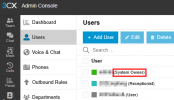
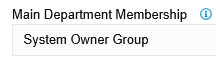
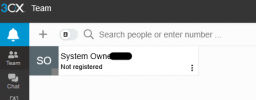
If you have put the system owner/admin extension in another group it won't show the DEFAULT or other groups on the Team page.
1761834918817.png
1761834951863.png
 

Forum statistics

Threads
111,954
Messages
589,921
Members
164,852
Latest member
priya