- Joined
- Jan 20, 2017
- Messages
- 473
- Reaction score
- 144
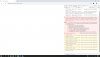
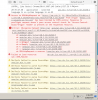
When you open a link to your personal Click2Meet, an empty page opens in the browser. The same thing happens when you click on a link https://demo.3cx.net/webrtc/join/demo . If you look at the errors in the console, I see this:
12:57:08.77 - application - browsers Object
app.min.js?ver=10.5.10.26258:1 12:57:08.78 - application - detected browser Object
app.min.js?ver=10.5.10.26258:1 12:57:08.78 - application - detected browser: Mozilla/5.0 (Windows NT 10.0; Win64; x64) AppleWebKit/537.36 (KHTML, like Gecko) Chrome/80.0.3987.132 YaBrowser/20.3.1.195 Yowser/2.5 Safari/537.36 Object
app.min.js?ver=10.5.10.26258:1 12:57:08.100 - application - selected language is ru system language is ru
demo:1 Access to XMLHttpRequest at 'https://wm-cdn.3cx.net/10.5.26258/html/view.html?ver=10.5.10.26258' from origin 'https://demo.3cx.net' has been blocked by CORS policy: Response to preflight request doesn't pass access control check: No 'Access-Control-Allow-Origin' header is present on the requested resource.
2angular.min.js?ver=10.5.10.26258:125 Error: [$compile:tpload] http://errors.angularjs.org/1.6.10/$compile/tpload?p0=html/view.html?ver=10.5.10.26258&p1=-1&p2=
at angular.min.js?ver=10.5.10.26258:7
at angular.min.js?ver=10.5.10.26258:163
at angular.min.js?ver=10.5.10.26258:137
at m.$digest (angular.min.js?ver=10.5.10.26258:148)
at m.$apply (angular.min.js?ver=10.5.10.26258:152)
at k (angular.min.js?ver=10.5.10.26258:103)
at s (angular.min.js?ver=10.5.10.26258:108)
at XMLHttpRequest.w.onerror (angular.min.js?ver=10.5.10.26258:109)
(anonymous) @ angular.min.js?ver=10.5.10.26258:125
DevTools failed to parse SourceMap: https://wm-cdn.3cx.net/10.5.26258/lib/angular.min.js.map
DevTools failed to parse SourceMap: https://wm-cdn.3cx.net/10.5.26258/lib/angular-route.min.js.map
DevTools failed to parse SourceMap: https://wm-cdn.3cx.net/10.5.26258/lib/ui-scroll.js.map
DevTools failed to parse SourceMap: https://wm-cdn.3cx.net/10.5.26258/lib/progressbar.min.js.map
DevTools failed to parse SourceMap: https://wm-cdn.3cx.net/10.5.26258/lib/angular-sanitize.min.js.map
DevTools failed to parse SourceMap: https://wm-cdn.3cx.net/10.5.26258/lib/angular-resource.min.js.map
DevTools failed to parse SourceMap: https://wm-cdn.3cx.net/10.5.26258/css/bootstrap.css.map
I checked it on different computers and different browsers.
I used different networks.
Google Chrome 80.0.3987.149
Microsoft Edge 80.0.361.69
Yandex 20.3.1.195 (64-bit)
When I go through the ios app webmeeting-it works great.
12:57:08.77 - application - browsers Object
app.min.js?ver=10.5.10.26258:1 12:57:08.78 - application - detected browser Object
app.min.js?ver=10.5.10.26258:1 12:57:08.78 - application - detected browser: Mozilla/5.0 (Windows NT 10.0; Win64; x64) AppleWebKit/537.36 (KHTML, like Gecko) Chrome/80.0.3987.132 YaBrowser/20.3.1.195 Yowser/2.5 Safari/537.36 Object
app.min.js?ver=10.5.10.26258:1 12:57:08.100 - application - selected language is ru system language is ru
demo:1 Access to XMLHttpRequest at 'https://wm-cdn.3cx.net/10.5.26258/html/view.html?ver=10.5.10.26258' from origin 'https://demo.3cx.net' has been blocked by CORS policy: Response to preflight request doesn't pass access control check: No 'Access-Control-Allow-Origin' header is present on the requested resource.
2angular.min.js?ver=10.5.10.26258:125 Error: [$compile:tpload] http://errors.angularjs.org/1.6.10/$compile/tpload?p0=html/view.html?ver=10.5.10.26258&p1=-1&p2=
at angular.min.js?ver=10.5.10.26258:7
at angular.min.js?ver=10.5.10.26258:163
at angular.min.js?ver=10.5.10.26258:137
at m.$digest (angular.min.js?ver=10.5.10.26258:148)
at m.$apply (angular.min.js?ver=10.5.10.26258:152)
at k (angular.min.js?ver=10.5.10.26258:103)
at s (angular.min.js?ver=10.5.10.26258:108)
at XMLHttpRequest.w.onerror (angular.min.js?ver=10.5.10.26258:109)
(anonymous) @ angular.min.js?ver=10.5.10.26258:125
DevTools failed to parse SourceMap: https://wm-cdn.3cx.net/10.5.26258/lib/angular.min.js.map
DevTools failed to parse SourceMap: https://wm-cdn.3cx.net/10.5.26258/lib/angular-route.min.js.map
DevTools failed to parse SourceMap: https://wm-cdn.3cx.net/10.5.26258/lib/ui-scroll.js.map
DevTools failed to parse SourceMap: https://wm-cdn.3cx.net/10.5.26258/lib/progressbar.min.js.map
DevTools failed to parse SourceMap: https://wm-cdn.3cx.net/10.5.26258/lib/angular-sanitize.min.js.map
DevTools failed to parse SourceMap: https://wm-cdn.3cx.net/10.5.26258/lib/angular-resource.min.js.map
DevTools failed to parse SourceMap: https://wm-cdn.3cx.net/10.5.26258/css/bootstrap.css.map
I checked it on different computers and different browsers.
I used different networks.
Google Chrome 80.0.3987.149
Microsoft Edge 80.0.361.69
Yandex 20.3.1.195 (64-bit)
When I go through the ios app webmeeting-it works great.