i got this issue when i run the Firewall Check

irfan2

Free User
Joined
Nov 7, 2024
Messages
28
Reaction score
0
  • resolving 'febno.ddns.net'... done
  • resolving 'stun2.3cx.com'... done
  • resolving 'stun3.3cx.com'... done
  • resolving 'sip-alg-detector.3cx.com'... done
  • testing 3CX PhoneSystem 01 SIP Server... failed (How to resolve?)
    • stopping service... done
    • detecting SIP ALG... detected (sent edbc6a8e ≠ 835c801e) (How to resolve?)
    • testing port 5060... Mapping does not match 5060. Mapping is 28316. (How to resolve?)
    • starting service... done
  • testing 3CX PhoneSystem Media Server...
    • stopping service... done
    • testing port 5090... Mapping does not match 5090. Mapping is 11639. (How to resolve?)
Why this? How to recover?
 
You need to fix your firewall... Just follow the manual.
 
  • Like
Reactions: N_G
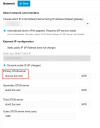
First things first, you arent using the 3CX STUN servers to perform the test. Adjust the 3CX network settings to reflect the STUN server and do the test again.

The STUN server should be "stun-eu.3cx.com"

1730988657109.png

You do NOT add your DNS server here.
 
  • Like
Reactions: PaulC_ and bitn2
As an FYI, you do not need to have DDNS to support a Dynamic IP Address in 3CX, we will do the change of the DNS entry for a 3CX FQDN for you when it changes.
 
Hello 3CX Support Team,

I am working on integrating my on-premise 3CX instance with another instance hosted by 3CX, using a bridge connection to enable seamless communication between the two systems. However, I am encountering a persistent firewall error during this setup. Here are the details of my environment and the issue:

  1. Integration Goal: I aim to establish a bridge between my on-premise 3CX system and the cloud-hosted 3CX instance, so calls and extensions can flow between both environments.
  2. Network Configuration:
    • The on-premise 3CX server is installed behind a firewall.
    • I have attempted to set up the bridge following the 3CX documentation but encountered a firewall error in the 3CX firewall checker, which appears to be blocking the connection between the two instances.
  3. Firewall Error Details:
    • The firewall checker indicates that specific ports required for the bridge (such as 5060 for SIP and the necessary RTP ports) are not accessible.
    • I have configured port forwarding for the necessary SIP and RTP ports on my on-premise firewall to allow inbound and outbound traffic, but the issue persists.
  4. Questions:
    • Could you provide guidance on the precise firewall and port forwarding rules needed to establish a reliable bridge between an on-premise 3CX system and a 3CX cloud-hosted instance?
    • Are there additional ports or settings that need to be enabled to ensure that the two systems can communicate seamlessly?
    • Would enabling IP-based authentication or TLS help mitigate firewall-related issues in this setup? If so, could you advise on any additional configuration steps needed?
 
i have done port forwarding with my local ip but it is still not working
 
is there any another options to integrate on-premise to cloud without firewall configuration
 
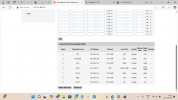
Than you must done something wrong. Show some screens from your portforwarding.
 
Screenshot 2024-10-29 161333.png
192.168.1.47 is my local ip address that i obtain by edit in cmd as"ipconfig"
 
Did you do the modifications I mentioned? Without those done your fireweall check is going to be inacurate.

is there any another options to integrate on-premise to cloud without firewall configuration
If the correct information cannot reach the on premises system then you will just be throwing eggs on a wall.

Its like trying to get a package delivered to your home and you dont open the door. The package will stay outside and get wet.
 
  • Like
Reactions: bitn2
Did you do the modifications I mentioned? Without those done your fireweall check is going to be inacurate.


If the correct information cannot reach the on premises system then you will just be throwing eggs on a wall.

Its like trying to get a package delivered to your home and you dont open the door. The package will stay outside and get wet.
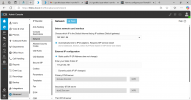
YES I HAVE DONE THAT1731056183265.png
 
Your IP Address according to that screenshot is 192.168.1.86, not 192.168.1.47.

If you have multiple interfaces on your machine, either disable 1 of them, or on the 2nd interface, remove the default gateway.
 
  • Like
Reactions: bitn2
You need to forward to your PBX not your pc! The PBX has the IP 192.168.1.86 and not 47
 
That scrnsht i taken before few days and at that time my pbx was 192.168.1.47 but at then it wasn't wrking why?i have some issues in accessing router at my office now, it takes few days to correct that can you guys please tell me that what i have to do and my firewall issues will solve when i portforwarding into this ip address
 
First correct this issue and be sure the local ip is a fixed ip of the pbx. Than we can see if its working.
 
can you say if there is any another way to integrating on-premise to cloud by passing the firewall checking like method by using
VPN (Virtual Private Network):
Cloud-based SBC (Session Border Controller):
Direct SIP Trunk or IP Authentication:
 
First step first... Fix your firewall and than do the bridging
 
i don't have access for router now, I mean can i solve this firewall issue without accessing the router? Is there any another method to solve this?
 
I think.... you should either get a networking team to sort this for you or just go 3CX hosted.
 
  • Like
Reactions: precmfg and bitn2