I have a question 3CX web client on chrome recommend Wire or Wireless.

Status
Not open for further replies.

Jakkapan

Free User
Joined
Nov 5, 2020
Messages
11
Reaction score
0
Dear all,
In my office use 3CX on web via google chrome web browser So sometime we saw message wait network on dashboard but client can ping ti 3cx server and can ping to google.
So my client use notebook via wireless 5GHz product Cisco.

I try to find document about recommend about best practice about 3cx but not luck.

thank you
 
Hi,

If you see the message waiting for network, then it means the webclient lost its connection or the server is down.

If the server is ok, then most likely your PC just lost connection temporarily. If you refresh the page does the message go away?

Also does your ISP change your WAN IP very often?
 
Dear John

If you refresh the page does the message go away?
yes If we refresh the page message go away.


Also does your ISP change your WAN IP very often?
Not change very often the network was normal I can ping to 8.8.8.8 and can use internet but 3CX it show network waiting

So the issued was some client some notebook it random
do you recommend to use laptop LAN or Wireless if I use 3CX software base on Labtop

thank you
 
To eliminate the wireless being a problem, I would test for a day with LAN only.

Also in case you use any networking software like VPN, or proxies, keep in mind that they can affect the connection when they connect or disconnect or change routes.
 
Dear John
I am monitor the client with 2 laptop and access same Wireless So the problem found only 1 laptop not happen same laptop.

on the Wireless I change config WLAN for 3CX broadcast only 5 Ghz and on laptop have not antivirus turn off Firewall not VPN software.
 
Ok, but it's a good idea to switch off WiFi and connect LAN only for today, to see if the problem goes away
 
Dear John
thank you for answer
normally 3CX product recommend or not about use LAN more than Wireless.
 
LAN is preferable whenever you can use it. The problem with wireless is that it may work fine now, and not work well 5 minutes later because of congestion, noise, and generally competition from other networks and/or users.
 
Dear John
I did use LAN for 3CX but issued happen same the wireless
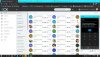
I saw the meesage in dashboard software phone on 3CX
"3cx client connecting to server unable to perform list request at the moment please try again later"
So after that I try to disable Firewall on window 10 but I don't know can solve the issued.
 

Attachments

  • messageImage_1604652066135.jpg
    messageImage_1604652066135.jpg
    237.6 KB · Views: 10
Dear John
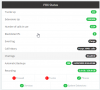
I saw on PABX status on topic firewall and trunks it show red colour.
This meaning status on Firewall in my office right.

thank you
 

Attachments

  • 2020-11-09_12-17-39.png
    2020-11-09_12-17-39.png
    28.3 KB · Views: 9
Yes, this means the firewall in the office where the 3CX server is installed.

I think you should click on the Firewall icon and run the firewall checker to see where it fails
 
Dear JoneS,

I think the network topology like this
Client>AP>WLC>CoreSwitch> Firewall > Internet > maybe cloud 3CX server

So I will run Firewall Icon for test. I have one question about the Trunks ISP
the ISP for use access to internet in my office not support SIP trunks I don't know it relate with problem or not because I see message about recommend ISP support SIP trunks

thank you
 
Hi,

There are many trunk providers that are not supported, but if they use SIP then the chances are very good that it will work ok. If you can make and receive externals calls, then there shouldn't be much of a problem.

Run the firewall checker and tell us the results
1605080562739.png
 
Dear JohnS,
firewall check I did asked my vendor support him inform already run firewall check status it ok,
I can not run for check because service 3cx will stop.

So I try to use 3CX via LAN and 4G via operator mobile but the issued is found like via WIFI.
Do you have any idea for check or solution for solve the problem ?
thank you
 
Yes, you need to double-check that your HTTPS port is reachable, from the place that the problematic PC is located.

The next time you have a problem, I would suggest to run WireShark on that computer and see if it can reach your PBX IP on port HTTPS 443. Ensure that other PCs from other locations works fine so we can eliminate the PBX being the problem.
 
Dear JohnS
my client told me again call disconnect So I check on PABX I see on logging it show Call answer drop.
how I check the reason why call disconnect sometime ?

11/25/2020 4:16:50 PM - Updating device Dev(527134793):[sip:[email protected]:5060;rinstance=1-6967ecafe1d54b34833805db744daf47 / 80540] by message: DevUpd Recv Req REGISTER from 127.0.0.1:5080 tid=Pjfcb9b3a873f64b35848e4a1abf684b51 Call-ID=3ac4a882009049b4948261b475436c1c: REGISTER sip:127.0.0.1:5060;transport=UDP SIP/2.0 Via: SIP/2.0/UDP 127.0.0.1:5080;branch=z9hG4bK-524287-2---Pjfcb9b3a873f64b35848e4a1abf684b51;rport=5080 Via: SIP/2.0/UDP [::ffff:119.110.224.50]:53793;branch=z9hG4bK-524287-1---tunneltid;rport;tnlid=clnt.1-6967ecafe1d54b34833805db744daf47 Via: SIP/2.0/TCP 192.168.139.192:50195;rport;branch=z9hG4bKPjfcb9b3a873f64b35848e4a1abf684b51;alias Max-Forwards: 69 Record-Route: <sip:[email protected]:5080;user=proxy;uri=clnt.1-6967ecafe1d54b34833805db744daf47> Contact: "Thongpichet Suwannagud" <sip:[email protected]:5060;rinstance=1-6967ecafe1d54b34833805db744daf47> To: "Thongpichet Suwannagud" <sip:[email protected]> From: "Thongpichet Suwannagud"<sip:[email protected]>;tag=f6f989a002bd46a9afe55be41e24efa4 Call-ID: 3ac4a882009049b4948261b475436c1c CSeq: 41240 REGISTER Expires: 120 Allow: PRACK, INVITE, ACK, BYE, CANCEL, UPDATE, INFO, SUBSCRIBE, NOTIFY, REFER, MESSAGE, OPTIONS Proxy-Authorization: Digest username="cszDviNPi2",realm="3CXPhoneSystem",nonce="414d535c15ceb20221:d27d2fd6aaf8abb1f370a3761d0dcddd",uri="sip:tdshop.3cx.asia;transport=tcp",response="5a1c12dce8b80de330dd9ac58e077804",algorithm=MD5 User-Agent: 3CXPhone for Windows 16.3.0.179 X-MakeCall: call;answer;drop;activate;divert Content-Length: 0
 
This is simply a registration log (CSEQ REGISTER), so it won't tell you anything about a specific call.

Also it's from a Windows client, and I thought you said you were facing issues with webclient losing the connection to the server rather than having dropped calls.

If we are talking about two different subjects you can open a new thread for that one, but again you will have to look at the activity log, filter that specific call and follow the trail from bottom to top and see who/why the call was dropped.
 
Dear Johns
Thank you I will open new topic
this issued different I see.
I'm apologise
 
Status
Not open for further replies.

Forum statistics

Threads
112,349
Messages
592,026
Members
165,512
Latest member
gmacinit