Icons missing when using Microsoft Edge

Status
Not open for further replies.

Gwish

Gold Partner
Advanced Certified
Joined
Oct 12, 2021
Messages
10
Reaction score
6
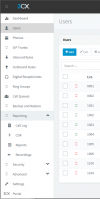
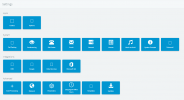
I'm at a loss as to why the icons are not showing up when using the management console.
1694704003266.png
 
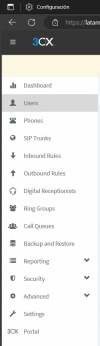
Hi @Gwish check that the edge version is 116.0.1938.81 (Compilación oficial) (64 bits)

Delete the cache and cookies and try it one more time.

From my side it looks ok

1694707368504.png
 
  • Like
Reactions: Gwish
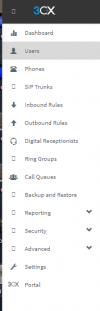
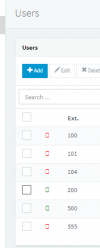
For a while now I have been getting the same issue with random icons in the left navigation, the status icons in the users tab and the settings menu. I have tried the latest Windows versions of the Microsoft Edge, Google Chrome and Brave browsers with the same results even after clearing cache, cookies, etc. I checked Safari in macOS and it works fine with no issue.


pic11.png pic22.png

pic33.png
 
  • Like
Reactions: Gwish
For a while now I have been getting the same issue with random icons in the left navigation, the status icons in the users tab and the settings menu. I have tried the latest Windows versions of the Microsoft Edge, Google Chrome and Brave browsers with the same results even after clearing cache, cookies, etc. I checked Safari in macOS and it works fine with no issue.


View attachment 38049 View attachment 38050

View attachment 38051
Can you try it as incognito mode? delete all cache and cookies, validate the browser is up to date.

Do not use any proxy in the browser.
 
  • Like
Reactions: Gwish
Can you try it as incognito mode? delete all cache and cookies, validate the browser is up to date.

Do not use any proxy in the browser.

Hello @Alejandro_3CX

In Google Chrome, I deleted all cache and cookies, verified the browser was up to date, logged into a 3CX server's management console and got the same results. I tried again and opened the same 3CX server's management console in Incognito mode and the icons displayed correctly. I tested going back and forth from standard and incognito and every time the standard mode is the same result and the incognito mode shows all the icons. It repeated the same testing and confirmed the same results with Microsoft Edge "InPrivate" mode and Bravo "Private" mode as well. Hopefully that helps find a solution.
 
  • Like
Reactions: Gwish
You may need to uninstall the browser and install it again from scratch, do not restore any previous data, plugins, etc

This is an issue in your browser and not related to the pbx.
 
You may need to uninstall the browser and install it again from scratch, do not restore any previous data, plugins, etc

This is an issue in your browser and not related to the pbx.

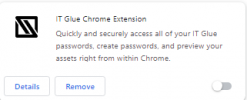
OK, so I did as suggested with both Microsoft Edge and Google Chrome. The issue was the IT Glue Chrome Extension which was installed on both browsers:

2023-11-06_07-58-02.png

As soon as you disable the extension and refresh the browser, all missing icons are restored.

Thanks again @Alejandro_3CX for the assistance. :)
 
Thanks for having shared the solution, may be it can save someone else :)
 
  • Like
Reactions: IrinaP_3CX
OK, so I did as suggested with both Microsoft Edge and Google Chrome. The issue was the IT Glue Chrome Extension which was installed on both browsers:

View attachment 38110

As soon as you disable the extension and refresh the browser, all missing icons are restored.

Thanks again @Alejandro_3CX for the assistance. :)
Awesome! This was the resolution.

I hope Kaseya can work with 3CX to get this resolved.
 
  • Like
Reactions: IrinaP_3CX
Status
Not open for further replies.