Identifying inbound calls to different SIP

Status
Not open for further replies.

Smallguy

Free User
Joined
May 29, 2020
Messages
31
Reaction score
4
Hi,

I'm getting the question how you can see to which number an incoming call is dialed.

I'll explain what I mean... ;-)

I have 2 trunks and 1 extension that can take both incoming calls.
How can you see which number the caller has dialed, so you can determine how to answer the call. With Company name (sip)1 or (sip)2...

Using Standard license.

Thanks!!
 
Hi @Smallguy,

This can be configured by using Inbound CID rules. If you set the inbound rule to the number on SIP 1 to Company name, when someone calls that number, it will show the Company Name.

You can find out more about Inbound Rules here. https://www.3cx.com/3cxacademy/videos/advanced/configuring-inbound-routing/

It may be handy to prepend the name so that it shows the Company Name before the number. To do so, from the Management Console >> Advanced >> Contacts >> Options >> Prepend Name.
 
Hi @VasilisV_3CX ,
Thanks for the prompt reply.

I get a little confused now in the whole way the 'Inbound' rules are applied.
My setup is now.

1. A SIP trunk, where I already Route the incoming call to a certain destination, in this case an IVR
2. An Inbound DID rule where basically the same is applied for that same Trunk in step 1. also pointing to the IVR in step 1.
3. Now I need to make another Inbound CID rule...?

- I have the feeling that my step 2 DID rule is unnecessary...? correct?
- I made a CID rule where I put the Company name in the 'Caller ID' field and moved it above the DID for this Trunk.. It's not working, the Company name is not displayed on the receiving 3cx app.
 
Hi @Smallguy,

Sorry for the confusion, I typed CID. I meant DID.

What you need is simply a DID rule for both trunks. One DID to one trunk. Make the name of the DID the Company name, and it should display before the number.

No CID rule necessary. Did your original DID rules not work?
 
Hi @VasilisV_3CX ,

Thanks, ok no problem. I removed the CID and there's now a DID rule with for the trunk where the DID name is the Company name and it will go to extension (ringgroup) as destination during office hours.

Now with this setting...
The 3CX will display a split second the ringgroup name (??) and right after this the name of the caller (probably taken from my android contacts list). The DID name is nowhere to be seen...?? So I couldn't identify to which trunk (number/company) the caller was calling to...

What am I overlooking here..?
 
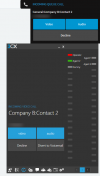
I've set up the same scenario on my side and I see the name of the Queue or Ring Group (if used, I've tried both and the name shows for the entire duration) the DID name (Company B) and the contact name (if present).


1616668931729.png

Are you using the browser app, mobile clients, IP phones or Web Clients?
 
Thanks @VasilisV_3CX
I'm using Android 3CX app only on this particular testing, and there's no queue, only a ring group (where the ring group is displayed for a split second while incoming call..., which you'll probably always miss since you're not eyeballing your mobile contstantly ;-)
 
I believe there have been some improvements in this area on the Beta we currently have.
I'd suggest giving it a shot to see what you will get on the next stable release.
 
@NickD_3CX & @VasilisV_3CX
I see that your 3CX app last update was over 5 months ago in 12/20

What work around do you offer in the meantime for those who use the 3CX Android 16.6.2 version to identify those calls coming in from different SIP? So that we can answer those people/clients with the correct Company name?
 
@NickD_3CX & @VasilisV_3CX
I see that your 3CX app last update was over 5 months ago in 12/20

What work around do you offer in the meantime for those who use the 3CX Android 16.6.2 version to identify those calls coming in from different SIP? So that we can answer those people/clients with the correct Company name?
Short of installing the Beta Android app (which works extremely well by the way so far) or waiting for the final release, there is not a lot really we can suggest for this particular behavior.
 
Thanks @NickD_3CX
If I understand you well, you say that the Beta has solved this issue?
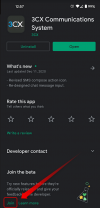
Where to get the Beta Android App?
 
Ah sorry, I didn't realize that was the question. You can do it right from within the Google Play Store:
1619085596065.png
 
thanks @NickD_3CX
If I understand you well, you say that the Beta has solved this issue?
(is able to identify those calls coming in from different SIP? So that we can answer those people/clients with the correct Company name?)
 
thanks @NickD_3CX
If I understand you well, you say that the Beta has solved this issue?
(is able to identify those calls coming in from different SIP? So that we can answer those people/clients with the correct Company name?)
What I am saying is that there have been changes in the Beta in this area (Number/Name presentation) and that you should try and see if it is better for you.

Any feedback on this will be welcome as not every Android phone is the same (unfortnately...) and not every PBX setup is the same.
 
Ok, will do some trial and error then ;-)
 
  • Like
Reactions: NickD_3CX
Status
Not open for further replies.