- Joined
- Jun 21, 2022
- Messages
- 6
- Reaction score
- 0
Code:
3CX
hosted
auto-updates enabled.
20.0.6.724

Client:
Chrome: 138.0.7204.184
macos sequoia (M3 chip)
No recent config changes but autoupdate is enabled and maybe something changed with an update.
In the office we have some DECT phones (yealink W90DM/B) and 3CX SBC running on an in-office server to ensure we don't have firewall/nat issues. Most people use the web client on their laptops and mobile app on their devices. I have not conducted a survey to see how many people are impacted, but I know several are having issues.
I'm working remote (not in office) and using web client. Symptom is that all calls from web client (in chrome) either direct to internal extension or to an external number no longer work. Web client dialing panel disappears less than a second after I hit the dial button (after entering the number). Same thing if I click on a team member to call them directly. No error tones or error message in web client.
Verbose logs for a sample call below. In particular I see these lines.
Code:
failure Cause: 486 Busy Here/INVITE
being terminated (CallerNotFound)
on terminated: 'Cause: BYE from PBX
leg terminated
cause RouteNotFound
I don't know why the route is not found since we are talking to the PBX okay up to a point. I suspect maybe the call is trying to route through the in-office SBC which is behind a firewall on a private IP and of course doesn't work. But not sure that is the case.
Okay I just noticed that in the calling panel of the web client there is an option to call via the DECT system and that seems to be selected by default instead of the browser. Of course I can't reach the DECT system when I am not in office. When I change web client to use the browser then calls work fine. So guess not the SBC.
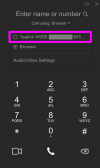
Is there a way to turn this option off since many people work from outside the office and it doesn't make sense for them to call via the DECT system when they have the web client or mobile app?
Probably someone more experienced will the issue right away. Thanks.
Code:
08/22/2025 11:20:06.428 AM  L:145.1[Extn:42{00000000-01dc-1345-f2cd-38a9000001e5}] detached from call; ads{1054959}
08/22/2025 11:20:06.428 AM  L:145.1[Extn:42{00000000-01dc-1345-f2cd-38a9000001e5}]: CONNECTION ID updated: 508 => 0
08/22/2025 11:20:06.427 AM  Removing connected for L:145.1[Extn:42{00000000-01dc-1345-f2cd-38a9000001e5}], terminate connected
08/22/2025 11:20:06.427 AM  [CDR] Call(C:145): leg terminated: Extn:42{00000000-01dc-1345-f2cd-38a9000001e5}, cause RouteNotFound
08/22/2025 11:20:06.427 AM  L:145.1[Extn:42{00000000-01dc-1345-f2cd-38a9000001e5}] is terminated
08/22/2025 11:20:06.427 AM  MCOrig{70299289}@C:145: L:145.1[Extn:42{00000000-01dc-1345-f2cd-38a9000001e5}]is terminated
08/22/2025 11:20:06.427 AM  DefSEHL:145.1[Extn:42{00000000-01dc-1345-f2cd-38a9000001e5}] leg terminated
08/22/2025 11:20:06.427 AM  Call(C:145): request to stop call recording @ L:145.1[Extn:42{00000000-01dc-1345-f2cd-38a9000001e5}]
08/22/2025 11:20:06.426 AM  L:145.1[Extn:42{00000000-01dc-1345-f2cd-38a9000001e5}]: on terminated: 'Cause: BYE from PBX
08/22/2025 11:20:06.426 AM  Removing connected for L:145.1[Extn:42{00000000-01dc-1345-f2cd-38a9000001e5}]
08/22/2025 11:20:06.426 AM  Call(C:145): request to stop call recording @ L:145.1[Extn:42{00000000-01dc-1345-f2cd-38a9000001e5}]
08/22/2025 11:20:06.426 AM  L:145.1[Extn:42{00000000-01dc-1345-f2cd-38a9000001e5}] being terminated (CallerNotFound)
08/22/2025 11:20:06.425 AM  L:145.1[Extn:42{00000000-01dc-1345-f2cd-38a9000001e5}]: destroying MSEP([email protected]:5482@?)
08/22/2025 11:20:06.425 AM  L:145.1[Extn:42{00000000-01dc-1345-f2cd-38a9000001e5}]: failure Cause: 486 Busy Here/INVITE from 127.0.0.1:5080
08/22/2025 11:20:06.424 AM  [MCReq]{C:145,id=256}: L:145.1[Extn:42{00000000-01dc-1345-f2cd-38a9000001e5}] is ringing
08/22/2025 11:20:06.423 AM  L:145.1[Extn:42{00000000-01dc-1345-f2cd-38a9000001e5}]: ringing
08/22/2025 11:20:06.423 AM  L:145.1[Extn:42{00000000-01dc-1345-f2cd-38a9000001e5}]: has answered outgoing INVITE
08/22/2025 11:20:06.150 AM  L:145.1[Extn:42{00000000-01dc-1345-f2cd-38a9000001e5}]: CONNECTION ID updated: 0 => 508
    08/22/2025 11:20:06.150 AM  L:145.1[Extn:42{00000000-01dc-1345-f2cd-38a9000001e5}] initiating call with InvOUT Send Req INVITE from 0.0.0.0:0 tid=b256d0383781eb09 Call-ID=U0UXaG71KqyRhFX0XLmlcQ..:
    INVITE sip:[email protected]:5060 SIP/2.0
    Via: SIP/2.0/ ;branch=z9hG4bK-524287-1---b256d0383781eb09;rport
    Max-Forwards: 70
    Route: <sip:[email protected]:5080;user=proxy;uri=sbc.a6053c80>
    Route: <sip:[email protected]:5060;user=proxy;tnlid=sbc.a6053c80>
    Contact: <sip:+49<REDACTED>@127.0.0.1:5060>
    To: <sip:42@<REDACTED>.on3cx.de>
    From: "MakeCall to +49<REDACTED>"<sip:+49<REDACTED>@<REDACTED>.on3cx.de:5060>;tag=b6fa110a
    Call-ID: U0UXaG71KqyRhFX0XLmlcQ..
    CSeq: 1 INVITE
    Allow: INVITE, ACK, CANCEL, OPTIONS, BYE, REGISTER, SUBSCRIBE, NOTIFY, REFER, INFO, MESSAGE, UPDATE
    Content-Type: application/sdp
    Supported: replaces, timer
    Content-Length: 436

    v=0
    o=3cxPS 3595464125448192 18792589473873921 IN IP4 127.1.2.3
    s=3cxPS Audio call
    c=IN IP4 127.1.2.3
    t=0 0
    m=audio 420 RTP/AVP 0 8 9 18 112 102 101
    a=rtpmap:0 PCMU/8000
    a=rtpmap:8 PCMA/8000
    a=rtpmap:9 G722/8000
    a=rtpmap:18 G729/8000
    a=fmtp:18 annexb=no
    a=rtpmap:112 opus/48000/2
    a=fmtp:112 maxplaybackrate=16000;sprop-maxcapturerate=16000
    a=rtpmap:102 telephone-event/48000
    a=rtpmap:101 telephone-event/8000
    a=sendrecv
08/22/2025 11:20:06.150 AM  L:145.1[Extn:42{00000000-01dc-1345-f2cd-38a9000001e5}]: disjoined MSEP([email protected]:5482@?) from MSC([email protected]:5482)
08/22/2025 11:20:06.150 AM  L:145.1[Extn:42{00000000-01dc-1345-f2cd-38a9000001e5}] took local SDP for offer: v=0
    o=3cxPS 3595464125448192 18792589473873921 IN IP4 127.1.2.3
    s=3cxPS Audio call
    c=IN IP4 127.1.2.3
    t=0 0
    m=audio 420 RTP/AVP 0 8 9 18 112 102 101
    a=rtpmap:0 PCMU/8000
    a=rtpmap:8 PCMA/8000
    a=rtpmap:9 G722/8000
    a=rtpmap:18 G729/8000
    a=fmtp:18 annexb=no
    a=rtpmap:112 opus/48000/2
    a=fmtp:112 maxplaybackrate=16000;sprop-maxcapturerate=16000
    a=rtpmap:102 telephone-event/48000
    a=rtpmap:101 telephone-event/8000
    a=sendrecv
08/22/2025 11:20:06.149 AM  L:145.1[Extn:42{00000000-01dc-1345-f2cd-38a9000001e5}]: state changed Init => TookOffer
08/22/2025 11:20:06.149 AM  L:145.1[Extn:42{00000000-01dc-1345-f2cd-38a9000001e5}]: created MSEP([email protected]:5482@[email protected]:5482) (unbound); joined, SRTP disabled
08/22/2025 11:20:06.149 AM  L:145.1[Extn:42{00000000-01dc-1345-f2cd-38a9000001e5}]: joined to MSCall(MSC([email protected]:5482))
08/22/2025 11:20:06.148 AM  L:145.1[Extn:42{00000000-01dc-1345-f2cd-38a9000001e5}]: Bridge endpoint: id = 123456; tunnel = sbc.a6053c80
08/22/2025 11:20:06.148 AM  Created UAC leg L:145.1[Extn:42{00000000-01dc-1345-f2cd-38a9000001e5}] for Destination Extn:42{00000000-01dc-1345-f2cd-38a9000001e5}; ads{1054959}
08/22/2025 11:20:06.147 AM  [CDR] Call(C:145): makecall init: caller Extn:42{}, target Ph#:.+49<REDACTED>
08/22/2025 11:20:06.147 AM  [MCReq]{C:145,id=256}: ctor (Extn:42{} -> Ph#:.+49<REDACTED>)
08/22/2025 11:20:06.147 AM  Found 1 contacts for 42
08/22/2025 11:20:06.147 AM  CA request makeCall(dn_from=42, number_to=+49<REDACTED>, handler=42)