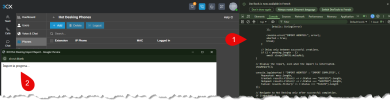
// 3CX Hot Desking Phones Bulk Import
// [Tested on 3CX v20.0.10.1801]
// >> Copy everything below to the end ↓↓ <<
var CONFIG = {
// === MAC Adresses ===
macAddresses: ["001122334455", "001122334466", "001122334477"], // Replace the MAC, enclosing each in quotes and separating them with commas. Don't add a comma after the last MAC.
// === CUSTOM CONFIGS ===
delayMs: 500, // Delay between creations (ms)
refreshDelayMs: 1500, // Delay before refresh (ms)
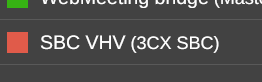
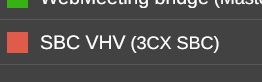
sbcDisplayName: "SBC VHV",
phoneModel: "Yealink T31P",
phoneTemplate: "yealinkT4x.ph.xml",
PhoneLanguage: "English", // English, Chinese_S, Chinese_T, French, German, Dutch, Italian, Portuguese, Russian, Spanish, Turkish, Polish, Czech, Czechlang, Arabic, Hebrew, Slovak
RingTone: "Ring 1", // Ring 1 to Ring 13, Silent, Splash
QueueRingTone: "Ring 6", // Same as RingTone
Codecs: ["PCMU", "PCMA", "G722", "G729"], // Priority order
PowerLed: "Both (Voicemail and Missed calls)", // Both (Voicemail and Missed calls), Voicemails only, Missed calls only, No Power LED notifications
ScreenSaver: "15 seconds", // 15 seconds, 30 seconds, 1 minute, 2 minute, 5 minutes, 10 minutes, 30 minutes, 1 hour, 2 hour, 3 hours, 4 hours, 6 hours, 8 hours, 12 hours
Backlight: "15 seconds", // Same, plus Always Off and Always On
TimeZone: "", // Empty = Global Time Zone
XferType: "BXfer" // BXfer, AttXfer
// === END ===
};
// *** ↓↓ DON'T MODIFY CODE ↓↓
// → → Unless 3CX signs your paycheck ! *
(async()=>{
const c=CONFIG,base=location.origin,hot="#/office/phones/hotdesking";
const sleep=ms=>new Promise(r=>setTimeout(r,ms));
const results=[];
if(!Array.isArray(c.macAddresses)||!c.macAddresses.length||
![c.delayMs,c.refreshDelayMs].every(v=>Number.isFinite(v)&&v>=0)||
![c.sbcDisplayName,c.phoneModel,c.phoneTemplate].every(v=>v?.trim())||
!Array.isArray(c.Codecs)||!c.Codecs.length)
return console.error("Invalid configs.");
const macs=c.macAddresses.map(m=>String(m).replace(/[:.\s-]/g,"").toUpperCase());
if(macs.some(m=>!/^[0-9A-F]{12}$/.test(m)))
return console.error("Invalid MAC.");
const win=window.open("","3cx_import_report","width=1050,height=650");
if(!win) return console.error("Allow popups.");
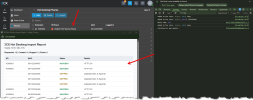
win.document.title="3CX Hot Desking Import Report";
win.document.body.textContent="In progress...";
const add=(index,HD,MAC,Status,Details)=>results.push({index,HD,MAC,Status,Details});
const count=s=>results.filter(r=>r.Status===s).length;
const showReport=()=>{
const report=[...results].sort((a,b)=>a.index-b.index).map(({index,...r})=>r);
const esc=v=>String(v??"").replace(/[&<>"']/g,ch=>({"&":"&","<":"<",">":">",'"':""","'":"'"})[ch]);
if(!win.closed){
const d=win.document;
d.open();
d.write(`<!DOCTYPE html><html lang="en"><meta charset="UTF-8">
<title>3CX Hot Desking Import Report</title>
<style>
body{font:14px Arial,sans-serif;margin:30px;color:#222;background:#f8f9fb}
h2{margin-bottom:6px}.summary{margin:18px 0;font-weight:bold}
table{width:100%;border-collapse:collapse;background:white}
th,td{padding:11px;text-align:left;border-bottom:1px solid #ddd}
th{background:#e9edf2}.SUCCESS{color:#16803c;font-weight:bold}
.SKIPPED{color:#a56a00;font-weight:bold}.FAILED{color:#c32f2f;font-weight:bold}
</style><body><h2>3CX Hot Desking Import Report</h2>
<div>${esc(c.phoneModel)} | ${esc(c.sbcDisplayName)}</div>
<div class="summary">Requested: ${macs.length} | Created: ${count("SUCCESS")} | Skipped: ${count("SKIPPED")} | Failed: ${count("FAILED")}</div>
<table><thead><tr><th>HD</th><th>MAC</th><th>Status</th><th>Details</th></tr></thead><tbody>
${report.map(r=>`<tr><td>${esc(r.HD)}</td><td>${esc(r.MAC)}</td><td class="${esc(r.Status)}">${esc(r.Status)}</td><td>${esc(r.Details)}</td></tr>`).join("")}
</tbody></table></body></html>`);
d.close();
}
console.table(report);
};
const captureToken=async()=>{
const dest=location.hash===hot?"#/office/phones":hot;
const p=XMLHttpRequest.prototype;
const f=window.fetch,o=p.open,h=p.setRequestHeader,s=p.send;
const xhr=new WeakMap();
let timer;
const promise=new Promise((resolve,reject)=>{
const capture=(url,auth)=>{
const u=new URL(url,location.href);
if(u.origin!==base||!u.pathname.startsWith("/xapi/v1/")) return;
const token=/^Bearer\s+(.+)$/i.exec(String(auth||"").trim())?.[1];
if(token) resolve(token);
};
window.fetch=function(input,init){
try{
const req=input instanceof Request;
const headers=new Headers(req?input.headers:undefined);
new Headers(init?.headers).forEach((v,k)=>headers.set(k,v));
capture(req?input.url:input,headers.get("Authorization"));
}catch{}
return f.apply(this,arguments);
};
p.open=function(method,url){
xhr.set(this,{url,auth:""});
return o.apply(this,arguments);
};
p.setRequestHeader=function(name,value){
const d=xhr.get(this);
if(d&&String(name).toLowerCase()==="authorization") d.auth=value;
return h.apply(this,arguments);
};
p.send=function(){
const d=xhr.get(this);
if(d){try{capture(d.url,d.auth)}catch{}}
return s.apply(this,arguments);
};
timer=setTimeout(()=>reject(Error("Timeout (5s).")),5000);
});
try{
location.hash=dest;
return await promise;
}finally{
window.fetch=f;
p.open=o;
p.setRequestHeader=h;
p.send=s;
clearTimeout(timer);
if(location.hash!==hot) location.hash=hot;
}
};
try{
const token=await captureToken();
if(!token) throw Error("Token not found");
const request=(path,opt={})=>fetch(base+"/xapi/v1/"+path,{
...opt,credentials:"include",
headers:{Authorization:`Bearer ${token}`,Accept:"application/json",...opt.headers}
});
const get=async path=>{
const r=await request(path);
if(!r.ok) throw Error(`GET ${r.status}: ${await r.text()}`);
return r.json();
};
const fqdn=(await get("Defs/Pbx.GetSystemParameters()")).FQDN?.trim();
if(!fqdn) throw Error("Missing FQDN.");
const query=new URLSearchParams({
"$filter":`DisplayName eq '${c.sbcDisplayName.replace(/'/g,"''")}'`,
"$select":"Name,DisplayName"
});
const sbcs=(await get("Sbcs?"+query)).value;
if(sbcs?.length!==1||!sbcs[0].Name)
throw Error("Invalid SBC Name");
const sbcName=sbcs[0].Name;
const seen=new Set(),pending=[],allocated=new Set();
for(const [index,mac] of macs.entries()){
let reason=null;
if(seen.has(mac)) reason="Duplicate MAC in input";
else{
const q=new URLSearchParams({
"$search":`"${mac}"`,
"$filter":"DN/Type eq 'Extension'",
"$top":"1",
"$count":"true"
});
const data=await get("SipDevices?"+q);
if(!Array.isArray(data.value))
throw Error(`Invalid MAC lookup: ${mac}`);
if(data.value.length||data["@odata.count"]>0)
reason="Already assigned to another user.";
}
seen.add(mac);
if(reason) add(index,"-",mac,"SKIPPED",reason);
else pending.push({index,mac});
}
const settings=Object.fromEntries([
"Codecs","RingTone","QueueRingTone","PhoneLanguage","XferType",
"PowerLed","ScreenSaver","Backlight","TimeZone"
].map(k=>[k,c[k]]));
let aborted=false;
for(const [i,{index,mac}] of pending.entries()){
let hd="-";
try{
hd=(await get("Users/Pbx.GetFirstAvailableHotdeskingNumber()")).Number;
if(typeof hd!=="string"||!/^HD\d{5}$/.test(hd))
throw Error("Invalid number.");
if(allocated.has(hd))
throw Error(`Duplicate: ${hd}`);
const payload={
Number:hd,HotdeskingAssignment:"",FirstName:hd,Internal:true,
RecordCalls:false,VMEnabled:false,MyPhonePush:false,HideInPhonebook:true,
Phones:[{
Name:c.phoneModel,TemplateName:c.phoneTemplate,MacAddress:mac,Interface:fqdn,
Settings:{...settings,IsSBC:false,TimeFormat:"24-hour clock",
DateFormat:"WWW MMM DD (Mon Jan 15)",SbcName:sbcName,ProvisionType:"SBC"}
}]
};
const r=await request("Users",{
method:"POST",headers:{"Content-Type":"application/json"},body:JSON.stringify(payload)
});
const ok=r.status===200||r.status===201;
add(index,hd,mac,ok?"SUCCESS":"FAILED",ok?`HTTP ${r.status}`:`HTTP ${r.status}: ${await r.text()}`);
if(!ok){aborted=true;break}
allocated.add(hd);
}catch(e){
add(index,hd,mac,"FAILED",String(e));
aborted=true;
break;
}
if(i<pending.length-1) await sleep(c.delayMs);
}
showReport();
console.log(aborted?"ABORTED":"COMPLETED");
if(!aborted){
await sleep(c.refreshDelayMs);
const target=base+"/"+hot;
if(location.href===target) location.reload();
else location.replace(target);
}
}catch(e){
if(results.length) showReport();
if(!win.closed){
const error=win.document.createElement("p");
error.textContent=`Import aborted: ${e.message}`;
win.document.body.appendChild(error);
}
console.error("ABORTED:",e.message);
}
})();
// END OF SCRIPT - Paste everything, including this line !