inbound call always send and invite sip header with private IP

cto.plasgate

Bronze Partner
Basic Certified
Joined
Jan 14, 2020
Messages
8
Reaction score
0
Hi,

i am facing an issue with sip trunk that i can call out normal, but for call in always error as below event log

"
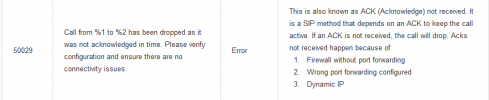
Call from "069299356"<sip:[email protected];transport=udp;user=phone>;tag=flhhaxyl-CC-1078-OFC-37 to "016222740"<sip:[email protected];transport=udp;user=phone> has been dropped as it was not acknowledged in time. Please verify configuration and ensure there are no connectivity issues. "

my 3cx system is being running with debian V20 and under router Mikrotik, i have to do rule forwarding as 3cx guide and test firewall from 3cx system all passed.

could anyone help on this as i have been troubleshooting this for a while seem still the same. even pcap or SIP
Public IP in SIP via Header configure public though.
 

Attachments

  • Screenshot from 2024-11-15 15-52-19.png
    Screenshot from 2024-11-15 15-52-19.png
    58.4 KB · Views: 30
  • Screenshot from 2024-11-15 15-57-54.png
    Screenshot from 2024-11-15 15-57-54.png
    320.9 KB · Views: 29
I'm having the same issue between. Are you getting Error 50029?
1732044120260.png
 
I'm facing the same error, my trunk randomly goes unregistered.
 
Hi,

i am facing an issue with sip trunk that i can call out normal, but for call in always error as below event log

"
Call from "069299356"<sip:[email protected];transport=udp;user=phone>;tag=flhhaxyl-CC-1078-OFC-37 to "016222740"<sip:[email protected];transport=udp;user=phone> has been dropped as it was not acknowledged in time. Please verify configuration and ensure there are no connectivity issues. "

my 3cx system is being running with debian V20 and under router Mikrotik, i have to do rule forwarding as 3cx guide and test firewall from 3cx system all passed.

could anyone help on this as i have been troubleshooting this for a while seem still the same. even pcap or SIP
Public IP in SIP via Header configure public though.
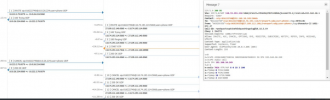
Yes i am received that error code 50029, unfortunately i try many ways seem nothing better,
 
@cto.plasgate
I've sent you a pm
Hi IliasL,

Sorry for late responding, anyway i can not find and pm from yours, could you please interract me here or findout this issue?
Please suggestion,

Thanks!
 
@cto.plasgate
I've sent you a new pm as we will need to view the support info files which contains the phone system's configuration
 
I am also having this same issue. This is a self hosted instance installed on a fully patched version of Windows Server 2019 Standard Edition.

I updated to 3CX version 20 from 3CX Version 18 update 9 over this past weekend, the system worked perfectly before the update. I created a backed up in version 18 and uninstalled it, restarted the server and installed version 20 using the version 18 backup.

Version 20 seems to have installed correctly and the system passes the firewall test. Other than installing version 20 and making sure windows was fully updated, no changes have been made. The firewall configuration (PFSense) and the Windows Server IP Address configurations are identical as before.

We use a SIP Trunk from Voxtelesys and Inbound calls are getting disconnected after about 30 seconds with error message 50029. Outbound calls and inbound/outbound text messages thru the trunk seem OK. I have confirmed that everything is setup to use the Default Department and the Default Department has the correct office hours. My user account is also setup as the system owner. Any ideas what could be causing this?


Edit:

I have also now deleted and re-created the SIP trunk but that didn't fix the issue either.
 
Last edited:
@thegrs do you have a ticket open with us? We would like to do a capture if we have not already done so.

Dropped calls around 30 seconds typically are:
1. SIP ALG (since you were working on V18 my guess is this is not the case)
2. Wrong IP listed under the network settings, if you are using a dual wan or installed the PBX at a new IP then this could cause the PBX to tell Voxtelesys to contact you at a different IP in the 200OK message.
3. Firewall blocking the ACK or 200 SIP messages resulting in the call to be dropped.
 
  • Like
Reactions: Nathan@Voxtelesys
I opened one this morning in the customer portal, ticket # 122179.
 
Issue is resolved, it was option 2 listed earlier.
 
Can you tell us how you exactly fixed it? I’m having the same issue here.
Actually what my system is doing is sending out invites with the IP of the previous v18 server's public IP address from my old data center....
 
@TPR3CX my issue was caused by the External IP of the 3CX system not being set correctly. Our normal internet traffic leaves our network on x.x.x.50. The version 18 3CX system was set to leave our network on x.x.x.54. Somehow when I installed Version 20 it didn't take the x.x.x.54 from the backup and somehow set itself to x.x.x.50. when I changed it to the x.x.x.54 address and refreshed the registration of the SIP trunk it worked.

The IP Address setting is under Admin > Advanced > Network > External IP Configuration
 
@TPR3CX my issue was caused by the External IP of the 3CX system not being set correctly. Our normal internet traffic leaves our network on x.x.x.50. The version 18 3CX system was set to leave our network on x.x.x.54. Somehow when I installed Version 20 it didn't take the x.x.x.54 from the backup and somehow set itself to x.x.x.50. when I changed it to the x.x.x.54 address and refreshed the registration of the SIP trunk it worked.

The IP Address setting is under Admin > Advanced > Network > External IP Configuration
I’m having the same issue. On my v18 it was under 216.x.x.x and now in my AWS, it’s on v20 and the network is on 52.x.x.x but my carrier is still showing ACKs going out with the old 216 IP even though my settings have the new IP. I can’t figure out where it’s getting the old IP from. A Reddit post I found said to maybe release the FQDN and reapply it in the license portal but 3CX advised against that. So here I am still not able to take incoming calls where voice isn’t going through and the connection only lasts for 30 seconds.
 
Actually what my system is doing is sending out invites with the IP of the previous v18 server's public IP address from my old data center....
If that is the case you can create a new registration from the portal and update your inbound route to the new registration. If the PBX is on a new IP then the new reg will only communicate with the new IP/route. Once it is working you can delete the old reg or create a ticket to have our support remove it.
 
I’m having the same issue. On my v18 it was under 216.x.x.x and now in my AWS, it’s on v20 and the network is on 52.x.x.x but my carrier is still showing ACKs going out with the old 216 IP even though my settings have the new IP. I can’t figure out where it’s getting the old IP from. A Reddit post I found said to maybe release the FQDN and reapply it in the license portal but 3CX advised against that. So here I am still not able to take incoming calls where voice isn’t going through and the connection only lasts for 30 seconds.
You can try the new registration method mentioned above since it is a new IP. Make sure the old image is completely turned off as it could cause issues with device registration.
 
@TPR3CX, have you gone into Admin > Advanced > Parameters and searched for the old IP Address to see if it is still listed under one of the parameters?

I am sure that 3CX doesn't recommend doing this or changing those settings but if you have a backup, I would change any references from the old IP to the new one there.
 
@TPR3CX, have you gone into Admin > Advanced > Parameters and searched for the old IP Address to see if it is still listed under one of the parameters?

I am sure that 3CX doesn't recommend doing this or changing those settings but if you have a backup, I would change any references from the old IP to the new one there.
All my settings in the Admin portal have the new IP addresses. The only thing I can imagine is that the old IP is coming from somewhere in the PBX's config that is not connected to the admin portal, or from 3CX which may be part of their licensing enforcement strategy and hasn't been updated on their end and the PBX gets the value from there.
 
You can try the new registration method mentioned above since it is a new IP. Make sure the old image is completely turned off as it could cause issues with device registration.
All the 3CX services on the old server have been turned of since the cutvoer.
 

Latest Posts

Forum statistics

Threads
111,990
Messages
590,161
Members
164,926
Latest member
tohoken1