Inbound Caller ID Setup

Status
Not open for further replies.

PipeItToDevNull

Free User
Joined
Aug 26, 2020
Messages
3
Reaction score
0
Currently my inbound calls appear as:

+##########:USER (##########)
:USER (##########)

### being the phone number and USER being the username of the extension

I have no clue where to even start getting this sorted. I would like to display the name of the caller, not my user. I am using voip.ms as my trunk.
 
The :user is going to be the calling path, for instance if the person went through a ring group that would show.

Is voip.ms set to send you caller ID with name? Or just the number?
 
I turned on ID and I was able to get a result, but it still appends what you call the 'calling path'. Can that be removed as well?
 
If your inbound rule has a name it will be displayed. You can remove the name from the inbound route and it won't show.
 
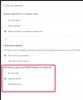
Depending on the scenario in question, you might also wanna look at the Contacts > Options menu in the management console

1598514773481.png
 
If your inbound rule has a name it will be displayed. You can remove the name from the inbound route and it won't show.
This resolved my issue. Thanks so much for the pointers.
 
Depending on the scenario in question, you might also wanna look at the Contacts > Options menu in the management console

View attachment 17657

Is there a way to over ride per rule? I ask as it would be nice to leave rule names in place but some customers don't want the name except for certain DIDs?
 
Hi,

The setting I posted before is general, it applies to to all
 
Status
Not open for further replies.

Latest Posts

Forum statistics

Threads
111,962
Messages
589,969
Members
164,864
Latest member
SCarpenter@fifthavenue-la