- Joined
- Oct 10, 2018
- Messages
- 8
- Reaction score
- 1
Hello,
I currently have a 3CX PBX and I have a SIP trunk configured with a provider.
The provider within the SIP trunk has added an additional number: 34XXXXXXX30
34XXXXXXX01 ----- I want you to go to extension 802
34XXXXXXX30 ----- I want you to go to extension 901
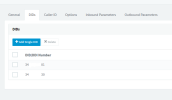
I have added the DID 34XXXXXXX30 within the SIP trunk, I have also configured an Inbound rule with that number to go to the 901 extension.
However, when I make a call to 34XXXXXXX30 it goes to the 802 extension which is the one configured in the main Trunk.
Can you please help me? I am not able to get it, I have looked at several manuals and forums but I cannot find a way.
I have tried to capture packets in info activity and I see that the call enters well within that SIP trunk but goes to extension 802
I also tried to config under sip trunk instead of 34XXXXXXX30 put *XXXX30 but same issue.
Thank you,
Cheers,
I currently have a 3CX PBX and I have a SIP trunk configured with a provider.
The provider within the SIP trunk has added an additional number: 34XXXXXXX30
34XXXXXXX01 ----- I want you to go to extension 802
34XXXXXXX30 ----- I want you to go to extension 901
I have added the DID 34XXXXXXX30 within the SIP trunk, I have also configured an Inbound rule with that number to go to the 901 extension.
However, when I make a call to 34XXXXXXX30 it goes to the 802 extension which is the one configured in the main Trunk.
Can you please help me? I am not able to get it, I have looked at several manuals and forums but I cannot find a way.
I have tried to capture packets in info activity and I see that the call enters well within that SIP trunk but goes to extension 802
I also tried to config under sip trunk instead of 34XXXXXXX30 put *XXXX30 but same issue.
Thank you,
Cheers,