Inbound Calls Report: SIP visibility

SystemWise

Silver Partner
Advanced Certified
Joined
Dec 12, 2014
Messages
39
Reaction score
9
I want to give an end user access to all the reports. I gave the user a "Supervisor" role, which allows him to see all the reports. However, when looking at the "inbound calls" report for instance there are no "Trunks" so select, so the report is blank. Changing the user to a "System Owner" role allows him to see the trunks and get the full reports, but I obviously don't want to give the user this level of access to the system.

Is there a way to give the user access to the reports, with visibility of the SIP trunk, without giving them the keys to the kingdom? They just want reports!
 
However, when looking at the "inbound calls" report for instance there are no "Trunks" so select, so the report is blank.
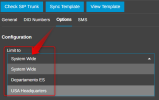
Please check the department assigned in the sip trunk.

1791474930817.png

If you want to view those calls, it must be the same department as the user with supervisor role.
 
Solution
Hello Alejandro,

Thanks for the feedback. I have two departments that use the same SIP trunk. Limiting it to one of them would stop the other department making outgoing calls? Is there another way to achieve this?

Regards,

Tony
 
Hello,

Trunk department assignment is primarily a management restriction. A department admin not in the same department as the trunk would not see its DIDs in order to assign them to users for example (a system admin would not have this issue).

So unless your outbound rules are limiting outgoing calls, then any user should be able to use the trunk to place calls.
 
Thank you for the clarification. It has since occurred to me that we left all users in the Default group, as well as their specific group, so we just changed the SIP to the default group to resolve.

Our outbound rules do not restrict by group so I assume your solution would have worked fine too.

Thank you both.
 

Forum statistics

Threads
112,232
Messages
591,411
Members
165,323
Latest member
Monika.Reddy