Solved Inbound DID - No option to use call routing

Status
Not open for further replies.

admzen

New User
Joined
Aug 20, 2022
Messages
4
Reaction score
1
Good Day,
I have successfully setup my cloud PBX. I am able to make calls and take calls. I even routed my calls to an IVR. However, call routing rules are not working and I do not see my DID line as following those rules.

pbxissue1.PNG

Even after hours, my calls are routed to my daytime receptionist (IVR) and I cannot change any settings in the DID other than to one place.
I thought the purpose of the office hours and call handling was to have these options? Where did I mess this up?

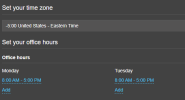
Before you ask, here are the office hours
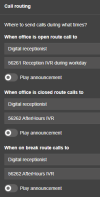
pbxissue2.PNGpbxissue3.PNG
Regards
Zen
 
Hi Zen,

How many numbers do you have in total? a main DID number and a secondary DID number?
 
Hi Zen,

How many numbers do you have in total? a main DID number and a secondary DID number?
I just have one number, I removed the DID. However the routing is still not changing based on the time of day (office hours)
 
I believe I found, that startup free does not contain the office hours routing feature, however I am on Pro for 30 days. Any advice?
 
So to sum up in simple terms

- You want calls going to 56261 during 08:00 - 17:00
- You want calls going to 56262 outside of 08:00 - 17:00
- But the result is that calls always go to 56261 during in and out of office hours?

If so then I think you should recheck outside of office hours, and you will find that it does indeed work. You can trigger an out of office scenario by changing your timezone to enough hours ahead or behind, then call your trunk number from your cell to see the difference.
 
So to sum up in simple terms

- You want calls going to 56261 during 08:00 - 17:00
- You want calls going to 56262 outside of 08:00 - 17:00
- But the result is that calls always go to 56261 during in and out of office hours?

If so then I think you should recheck outside of office hours, and you will find that it does indeed work. You can trigger an out of office scenario by changing your timezone to enough hours ahead or behind, then call your trunk number from your cell to see the difference.
Hey @JohnS_3CX Thank you for your reply. Yes, indeed the call seemed to be routing to the daytime IVR all the time. However, after changing the timezone, it seems to work! I have since changed it back and appears now is working. I appreciate your magic touch!
 
  • Love
Reactions: JohnS_3CX
Happy to hear! We will mark this one as solved then :)
 
Status
Not open for further replies.

Members Online Now

Forum statistics

Threads
111,831
Messages
589,277
Members
164,660
Latest member
RJenkinsROCK