Inbound rule or DID as variable in CRM integration XML

Status
Not open for further replies.

bramvandeperre

Free User
Joined
Dec 19, 2018
Messages
10
Reaction score
11
Hi all,

I've tweaked the standard Zendesk integration to use the Zendesk voice comment API and wrote a script to lookup the call recording in the recordings folder and serve it to Zendesk, so now we pretty much have voice tickets as Zendesk creates them with their own Talk product, including the relevant call recording and call metadata (who answered the call, what time was the call made, which customer, type of call).
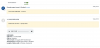
12017

The only thing missing is the number the customer dialled and there's no variable for this as far as I know.

Is there any way to have the Inbound rule or DID number available as variable in the CRM integration xml files for inbound calls? For outbound calls we understand it's impossible to know a DID since well, there isn't one, but the extension's outbound caller ID can be useful too in this case (from: outbound caller ID, to: customer number).

Thanks.
 
Is there any way to have the Inbound rule or DID number available as variable in the CRM integration xml files for inbound calls?
This is not available as a variable for the template at the moment. Please feel free to suggest this as a new feature in the 3CX Ideas site.

Also, if you could make a script to upload the recording, maybe you can do something similar to parse the CDRs where you have this information, and update the call record in Zendesk.
 
Also, if you could make a script to upload the recording, maybe you can do something similar to parse the CDRs where you have this information, and update the call record in Zendesk.
That'd be a possibility if Zendesk allowed to update these comments post submitting them, unfortunately they don't. It'd mean adding a second comment in there, which may be confusing to agents.

I also don't want to postprocess CDR records and start adding more API calls to Zendesk as they rate limit and we already hit this limit at times due to other integrations.

I'll just leave it as it is for now. Thanks anyway for your feedback.
 
I understand. The DID would be very useful information, so it's under our radar, however it's not available at the moment as a variable...
 
  • Like
Reactions: bramvandeperre
Maybe it's an idea to by default include a Zendesk integration which makes use of the Voice Comment API rather than the normal ticket API.

See https://developer.zendesk.com/rest_api/docs/support/ticket_comments#json-format-for-voice-comments for more information on this. It's a minor change, next to the call recording obviously needing to be accessible.

I've modified the XML to following:
XML:
<Scenario Id="CreateTicket" Type="REST">
      <Request SkipIf="[ReportCallEnabled]!=True" Url="https://[Domain].zendesk.com/api/v2/tickets.json" MessagePasses="0" RequestEncoding="Json" RequestType="Post" ResponseType="Json">
        <PostValues>
          <Object Key="ticket">
            <Value Key="requester_id" Passes="0" Type="String">[Contact::RequesterId]</Value>
            <Value Key="assignee_id" Passes="0" Type="String">[AssigneeId]</Value>
            <Value Key="organisation_id" Passes="1" Type="String">[Contact::OrganizationId]</Value>
            <Value Key="created_at" Passes="0" Type="String">[[CallStartTimeLocal].ToString("yyyy-MM-dd HH:mm:ss")] CET</Value>
            <Value Key="priority" Passes="0" Type="String">normal</Value>
            <Value Key="status" Passes="0" Type="String">open</Value>
            <Value Key="subject" Passes="2" Type="String">[[Subject]]</Value>
            <Object Key="voice_comment">
              <Value Key="from" Passes="1" Type="String">[Number]</Value>
              <Value Key="to" Passes="1" Type="String">+999999999</Value>
              <Value Key="recording_url" Passes="0" Type="String">https://fqdn.com/scriptlocation.php?ext=[Agent]&amp;number=[Number]&amp;time=[[CallStartTimeUTC].ToString("yyyyMMddHHmmss")]</Value>
              <Value Key="started_at" Passes="0" Type="String">[[CallStartTimeUTC].ToString("yyyy-MM-dd")]T[[CallStartTimeUTC].ToString("HH:mm:ss")]Z</Value>
              <Value Key="call_duration" Passes="0" Type="Integer">[[DurationTimespan].get_TotalSeconds().ToString("F0")]</Value>
              <Value Key="answered_by_id" Passes="0" Type="String">[AssigneeId]</Value>
           </Object>
            <Array Key="tags">
              <Value Passes="0" Type="String">[CallType]</Value>
              <Value Passes="0" Type="String">Call</Value>
              <Value Passes="0" Type="String">[Agent]</Value>
              <Value Passes="0" Type="String">3cx</Value>
            </Array>
          </Object>
        </PostValues>
      </Request>
      <Variables />
      <Outputs AllowEmpty="false" />
    </Scenario>

This allows the PHP script to search the extension's folder (/recordings/extension/*.wav) for files close to the timestamp, or files further away from given timestamp but containing the customer's phone number - this should be precise enough to get the actual recording even although the timestamp doesn't match up 100% with the file name. This happens whenever an agent opens the ticket (so whenever the Zendesk interface calls this URL with php script) and doesn't transfer the recording to Zendesk, therefore 3CX keeps full control over the file and availability of it.

The PHP script then opens the said file and serves it as a download with the original file name. If not found, it just passes a 404 header so Zendesk knows not to look further - recording simply isn't available.

Important is to disable the compression on recordings since the Zendesk player is just basic HTML5 and browsers can't play the (compressed) recording.
 
Last edited:
Nice! Thanks for sharing!
 
Status
Not open for further replies.

Latest Posts

Forum statistics

Threads
112,324
Messages
591,897
Members
165,475
Latest member
lastshadow