Inbound rule with IVR

Status
Not open for further replies.

InterNext.online

Customer
Joined
Mar 28, 2019
Messages
20
Reaction score
1
After the beta and other test phases, we have made the transition to V16.
When you don't choose you will automatically be transferred to our contact centre/reception, which is an external number in an extension, which worked fine in V15.5.

It seems that now when a caller, calls they will directly disregard the IVR and transferred to the operator extension.
That shouldn't happen, when you call internally to the reception extension it works fine, also all the IVR's works as it should.
But when an outside caller calls, it disregards the welcoming message and the IVR and will directly be transferred to the operator line.

Does someone has the same issue or maybe an idea of how to fix this issue.
As I've said before, in V15.5 it worked fine without incidents, now with V16 it really doesn't want to do what it suppose to do.

 
What does the 3CX Activity log show for the call? Any reason shown as to why the call goes where it does? callers do not reach the IVR at all, or reach it only to be immediately transferred to the operator?
 
I don't think it is nessisary to post all of that information, (or safe), it is the 3CX Activity Log that shows how calls are handled by the system.
 
I can insert for you the 3CX Activity Log but also that will show a lot of details.


Attachments

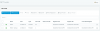
The inbound rules10019
 
80000 is the IVR that need to handle all incoming calls, it seems that it not using it.
And directly goes to 80001
 
Hi,
did you removed trunk and DID number in your inbound rules paste?

normally you should have concerned Trunk name, and DID number, if they are not set , inbound rule is not played so default route is
 
What is set as the Main trunk number destination under your trunk settings? Is it the 80001 extension? If so then that means that the Inbound call does not match the inbound rule because the format of the number of your DID does not match the number format sent by the provider. Or that your trunk is set to read the number from the wrong SIP field.
 
What is set as the Main trunk number destination under your trunk settings? Is it the 80001 extension? If so then that means that the Inbound call does not match the inbound rule because the format of the number of your DID does not match the number format sent by the provider. Or that your trunk is set to read the number from the wrong SIP field.
@YiannisH_3CX, As you see in the image, the Inbound rules are set to 80000, so that it goes to 80001 is not the normal routing.
 
Hi,
did you removed trunk and DID number in your inbound rules paste?

normally you should have concerned Trunk name, and DID number, if they are not set , inbound rule is not played so default route is
Due to the European GDPR, I needed to blank those out.
We, of course, have sad the trunk and DID to match the inbound rule, we have also certifications, so normally we can find out things that happen, without asking and solve it. Sadly every normal solution has failed so far. Maybe we need to recreate the trunk and the inbound rule, to be sure that there are no problems there. But that has been tried a few times already.
 
As you see in the image, the Inbound rules are set to 80000, so that it goes to 80001 is not the normal routing.
Yes but what is the destination set under the main trunk number, not the inbound rules. You can have multiple DIDs under the same trunk with multiple inbound rules but only one main trunk number destination (catch all routing).
 
Yes but what is the destination set under the main trunk number, not the inbound rules. You can have multiple DIDs under the same trunk with multiple inbound rules but only one main trunk number destination (catch all routing).

That's the question, which is easy to answer, the main setting in the trunk is, 80000 (IVR)
See the attached screenshot, where I have blanked out the phone number10028 due to the GDPR.
 
There is, of course, a little bug in your new system, see the attached screenshots, of one of the 3CX PBX that we are going to set up for a client. The dashboard says, there is one trunk and is active but then the question comes to mind, which trunk is active, becasue there isn't any added yet :D1003010029
 
There is, of course, a little bug in your new system, see the attached screenshots, of one of the 3CX PBX that we are going to set up for a client. The dashboard says, there is one trunk and is active but then the question comes to mind, which trunk is active, because there isn't any added yet :DView attachment 10030View attachment 10029
Sorry off topic, but I couldn't leave it, I was laughing so hard and got the idea that it would be best to give you 3CX a notice about it. It's a little bug that can be fixed.
 
this is webclient connector, seen as a trunk so that explain why you have one
 
Yes but what is the destination set under the main trunk number, not the inbound rules. You can have multiple DIDs under the same trunk with multiple inbound rules but only one main trunk number destination (catch all routing).

Also, we have 2 different numbers, one goes to the fax service. If people are calling that number it would be strange. But then it also needs to go to 80000 when it can't connect to the fax, so the strangest thing is that it is not using it.
 
this is webclient connector, seen as a trunk so that explain why you have one

Yeah, that could indeed be the case, but if one of our clients sees it, they are not liking it.
Some agencies do not like to have an invisible trunk, but yeah, that could be the case indeed. :)
 
if you have no trunk set in trunk menu how do you want 3cx to work with your flow
 
if you have no trunk set in trunk menu how do you want 3cx to work with your flow

This was a fresh PBX, not the PBX where we have the problems ;)
There we have 2 Trunks, of those to we, have a back-up one. Of course, see the attachment
10031
 
So in Trunk sip item and inbound rules like Yannish asked do you have the main number ?

complete number ?

Can you check how incoming calls are seen on 3cx side , is it matching with your inbound rule or not,
do you have several inbound rules ? did you change something in rule position (up or down ) or is it last state working fine?
 
Status
Not open for further replies.

Latest Posts

Forum statistics

Threads
112,358
Messages
592,092
Members
165,531
Latest member
fransisco